A customer has a question about a product, and they want the answer now, not in two days by email. Live chats on your website (and on WhatsApp or Instagram) give them that. The hard part is picking a tool when there are hundreds, and most "best of" lists are written for big companies with big budgets.
So here is a shorter, honest list of the best live chat software for small business in 2026. For each tool we say what it's good at, who it suits, and where it falls short. We also cover what a live chat system really needs to do for a lean team and how to add live chat to your website in an afternoon.
Before we dive in: AnytimeReply is our product, so it's on the list. We'll be fair about its limits too.
Quick picks: top live chat software for 2026
| Tool | Best for | Free plan |
|---|---|---|
| AnytimeReply | AI-powered live chat: AI answers first, team takes over | Yes |
| Tidio | Online stores, especially on Shopify | Check their pricing page |
| tawk.to | No-cost chat with unlimited agents | Yes |
| Crisp | A clean shared inbox for startups | Check their pricing page |
| LiveChat | Teams that live in chat all day | Free trial |
| Zoho SalesIQ | Businesses already on Zoho | Check their pricing page |
| HubSpot | Chat tied to a CRM | Yes, with free CRM tools |
| Zendesk | Teams that want full help desk software | Free trial |
| Intercom | Funded SaaS companies | Free trial |
| Gorgias | Shopify stores with many order questions | Check their pricing page |
Plans and free tiers change often, so always check each software provider's pricing page before you decide.
What is live chat software?
Live chat software puts a small chat window on your website so visitors can message your business and get a reply in real time. Most tools now also bring in messages from WhatsApp, Facebook Messenger, Instagram and email, so your support team answers everything from one inbox.
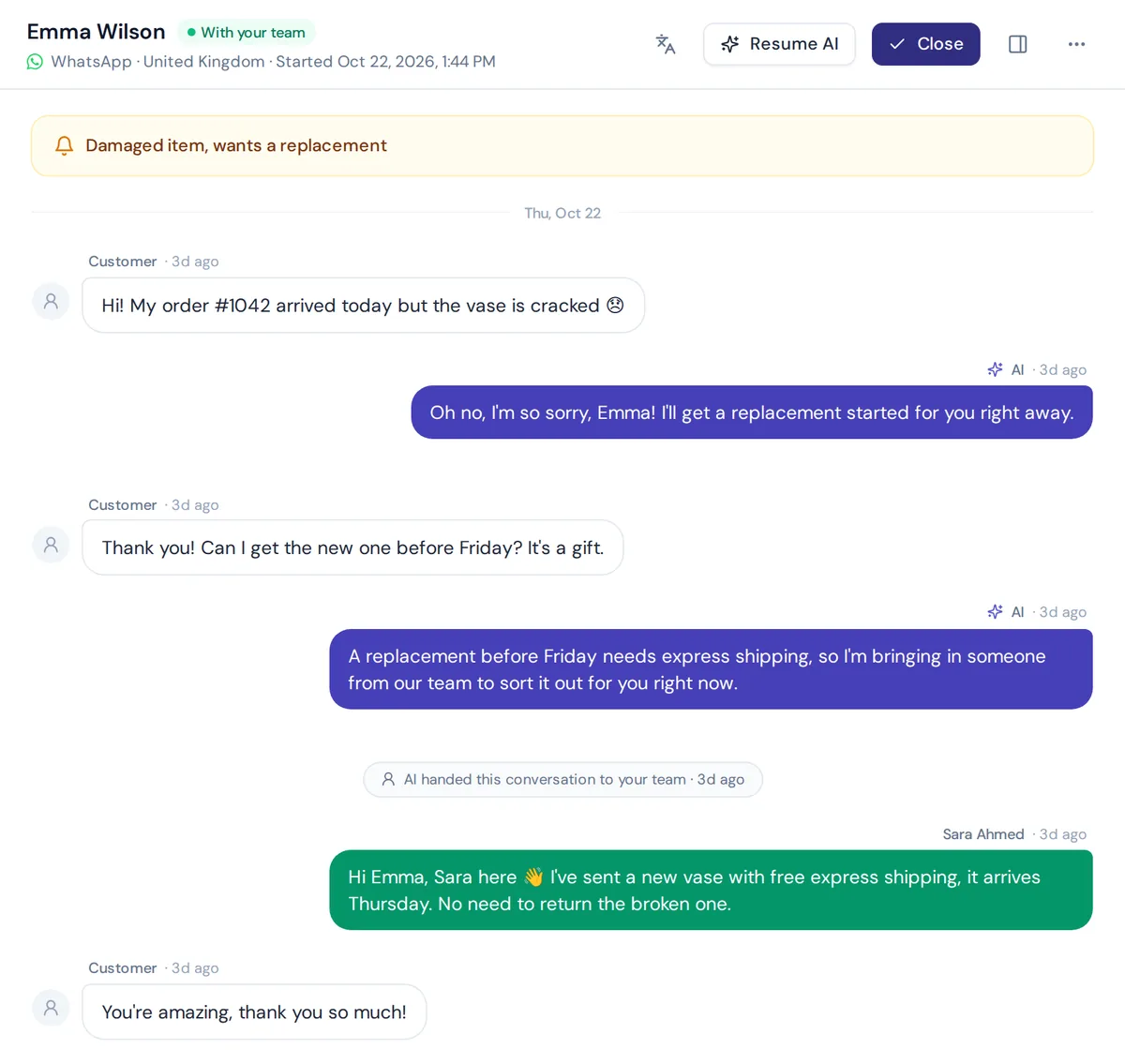
Offering live chat used to mean hiring someone to sit and wait. Now many tools include an AI chatbot. The AI answers common questions instantly, and a support agent takes over when needed. For a team of two or three, that mix is often the difference between "we reply in seconds" and "we reply tomorrow".
Why businesses invest in live chat support
Live chat is one of the cheapest ways to improve customer experience. Here is how live chat can help:
- Faster answers, more sales. A visitor deciding between two products is ready to buy now. A quick answer to "Is this in stock?" can close the sale before they leave.
- Cheaper than phone support. One chat agent can handle several live chats at once, which is how the right software helps a tiny team look big. Nobody can handle several calls at once.
- Customers expect it. People are used to messaging apps. Real-time chat feels natural, especially on mobile, and every customer interaction stays in writing.
- You learn what people ask. Chat analytics show what's confusing on your site, which products need better descriptions and which policies need a clearer page.
- Support outside office hours. With AI in the chat window, you can answer at 11 pm without staying up.
Among software for small businesses, few tools pay off this quickly. Businesses of all sizes benefit from live chat, but owner-run shops feel it most, because every lost visitor hurts.
Key features live chat software should include
You don't need every chat feature. You need the right few for your business needs. Here is what to check:
- Easy installation. A copy-paste snippet, a WordPress plugin or a Shopify app. If setup needs a developer, keep looking.
- A shared inbox. Every customer interaction in one place, with assignment so two people don't reply to the same customer.
- A mobile chat app. Owners answer from their phone, so the live chat app (or mobile dashboard) has to be good.
- AI or canned responses. Saved replies help. An AI that answers from your own content helps more.
- Multichannel. Website plus WhatsApp, Messenger, Instagram and email, if your customers use them.
- Offline handling. When nobody is online, the chat box should collect an email or let the AI answer, not show "no agents available".
- A customizable chat widget. Your colors, logo and greeting, so it looks like part of your site.
- Chat triggers and automation. Rules that tag, assign or prioritize chats automatically.
- Integrations. Shopify, WooCommerce, your CRM, Slack. Order lookups save a lot of time.
- Reports. A good live chat feature set includes insights into chat volume, response time and satisfaction ratings, without a data team.
- Fair pricing. Watch for per-seat pricing that grows fast and per-resolution AI fees that are hard to predict.
The 10 best live chat app options for small businesses
1. AnytimeReply
Best for: businesses that want AI to answer first and a person to take over the tricky chats, especially with customers writing in more than one language.
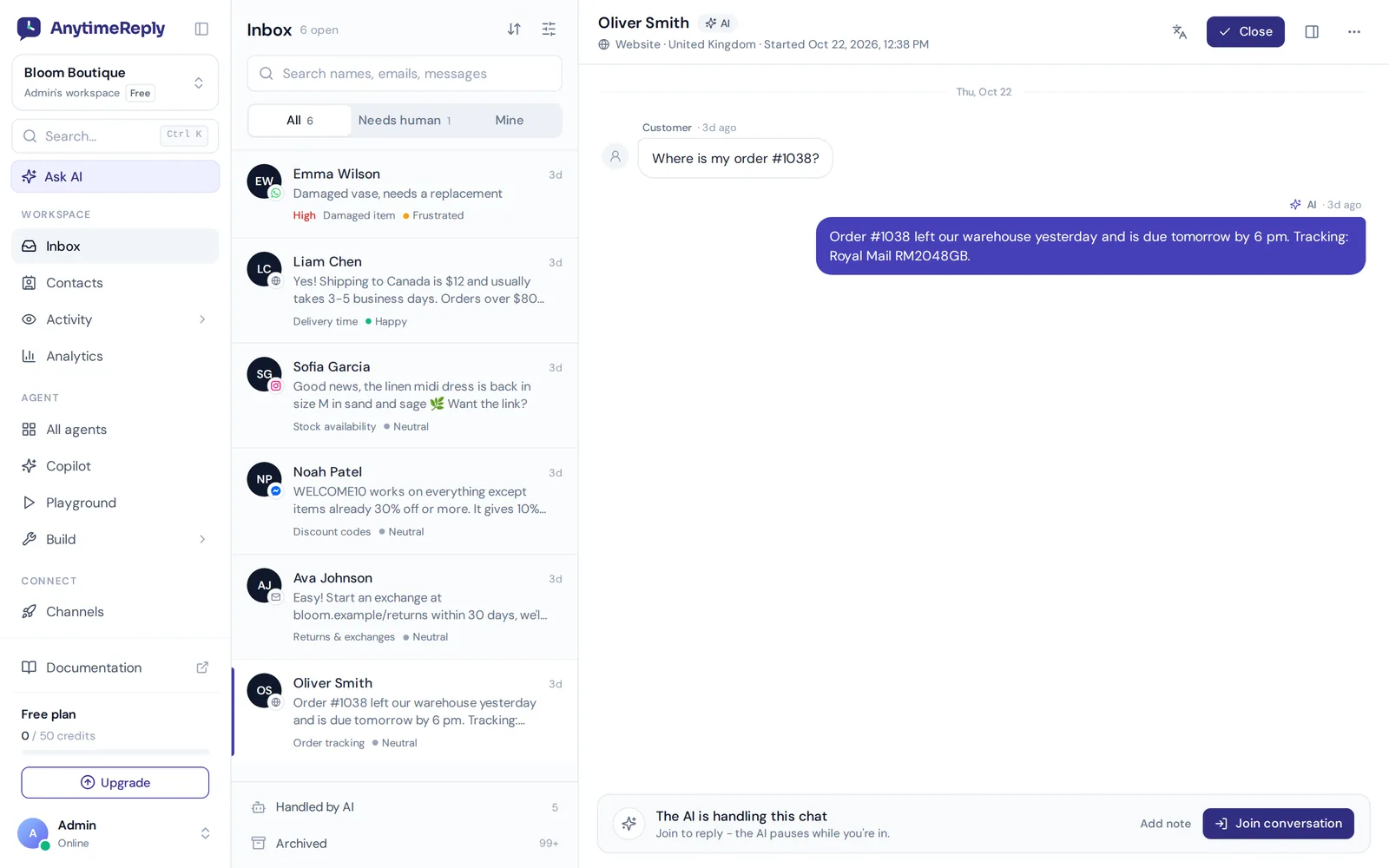
AnytimeReply is a customer support platform that helps businesses answer faster by combining an AI agent and a helpdesk with live chat. You add your website, documents or Shopify products, and the AI answers customers in seconds in their own language, including Bangla, Banglish, Hindi and Hinglish. When a customer asks for a person, gets upset or the AI can't answer, it hands the chat to your team with a summary.
- One inbox for site chat, WhatsApp, Messenger, Instagram, Telegram, email and Slack
- Departments, assignment (least busy or round robin), internal notes and @mentions
- Your team can join any chat; the AI pauses while a person is in
- Triggers to set priority, tag, assign or alert a manager automatically
- On paid plans, the AI can check orders in Shopify or WooCommerce for verified customers
Pricing: free forever plan with site chat, the helpdesk inbox and the AI agent (50 AI credits a month, 3 team members). Paid plans start at $9 a month and add WhatsApp, Messenger, Instagram and email. Team members are included, no per-seat fees. See pricing.
Limits: text only. No phone calls, voice or SMS, and no native mobile SDK for your own app. The free plan's 50 AI credits are for trying it out, not for a busy store.
2. Tidio
Best for: online stores, especially on Shopify and WordPress.
Tidio is one of the most popular chat tools for ecommerce shops. It combines live chat, a visual chatbot builder and its Lyro AI agent, and the interface is friendly for non-technical owners.
Watch out for: AI and some automation are priced separately from live chat seats, so costs can add up as you grow.
3. tawk.to
Best for: very small businesses that want a no-cost live chat service with no fuss.
tawk.to is known for being free, with unlimited agents and chats. It covers the basics: a website widget, a ticketing area and mobile apps. They make money from optional paid add-ons, like removing branding or hiring agents to answer for you.
Watch out for: the interface feels dated, and AI is limited compared with newer tools. Great for starting out, less so for automating.
4. Crisp
Best for: startups that want a tidy, modern shared inbox.
Crisp offers live chat, a shared inbox for chat, email and social messages, a knowledge base and chatbot tools. It's a versatile live chat option with a clean design, popular with SaaS startups.
Watch out for: many of the best features sit on higher plans.
5. LiveChat
Best for: teams where chat is the main channel and agents chat all day.
LiveChat is a mature, reliable live chat product focused on human agents: canned responses, routing, detailed reports and a big marketplace of integrations. Its sister product ChatBot adds automation.
Watch out for: it's priced per agent, which gets expensive for a lean team. There's a free trial, not a free plan.
6. Zoho SalesIQ
Best for: businesses already using Zoho CRM or Zoho Desk.
Zoho SalesIQ combines live chat with visitor tracking, so you can see who is on your site and which pages they view. It connects naturally with the rest of the Zoho suite, which suits sales and support teams that share data.
Watch out for: the dashboard has a lot going on, and it makes most sense if you're in the Zoho world already.
7. HubSpot live chat
Best for: teams that want chat linked to a CRM and marketing tools.
HubSpot includes live chat in its free CRM tools. Every chat creates or updates a contact, so sales and support see the full history. A solid pick if you plan to use HubSpot for email marketing or sales anyway.
Watch out for: the jump from free to paid HubSpot plans can be steep.
8. Zendesk
Best for: growing teams that want full help desk software with chat built in.
Zendesk's chat (long known as Zendesk Chat, now part of its messaging suite) sits inside one of the best known customer service platform suites. The platform offers ticketing, a knowledge base, AI agents and strong reporting in one place.
Watch out for: it can feel heavy for a business with one or two people answering, and costs grow with seats and add-ons.
9. Intercom
Best for: funded SaaS companies that want a complete customer messaging platform.
Intercom is known for its polished messenger, product tours and its Fin AI agent. It's powerful and well designed.
Watch out for: it's usually too expensive for a typical small business, with per-seat pricing plus per-outcome AI fees. We wrote an honest AnytimeReply vs Intercom comparison if you're weighing it up.
10. Gorgias
Best for: Shopify stores that get lots of "where is my order" messages.
Gorgias is a helpdesk built for ecommerce. It pulls order data from Shopify into each conversation, so agents can refund, edit or check orders without switching tabs.
Watch out for: pricing is based on ticket volume, which rises in busy seasons. Built for stores, so not a great fit for service businesses.
Other live chat software options worth a look: Freshchat, LiveAgent, Olark, JivoChat and Comm100. Many live chat tools look similar on paper, so a short trial tells you more than a feature list.
Best live chat support tools compared: HubSpot live chat, Zendesk chat and more
| Tool | AI chatbot | WhatsApp and social | Ecommerce focus | Pricing style |
|---|---|---|---|---|
| AnytimeReply | Yes, built in | Yes (paid plans) | Shopify, WooCommerce | Flat plans, team included |
| Tidio | Yes (Lyro) | Yes | Strong | Plans plus AI add-on |
| tawk.to | Limited | Limited | General | Free, paid add-ons |
| Crisp | Yes | Yes | General | Per workspace plans |
| LiveChat | Via ChatBot | Yes | General | Per agent |
| Zoho SalesIQ | Yes | Yes | General | Per operator |
| HubSpot | Yes | Yes | General | Free tools, paid hubs |
| Zendesk | Yes | Yes | General | Per agent |
| Intercom | Yes (Fin) | Yes | SaaS | Per seat plus AI per outcome |
| Gorgias | Yes | Yes | Strong (Shopify) | By ticket volume |
This table reflects what each live chat platform is generally known for, and how each tries to help businesses at different stages. Features change, so confirm details on each vendor's site.
How to find the best live chat tool for your business
Don't start with the feature list. Start with your situation, then choose live chat software for your business that fits it. Good AI chat software for small businesses should save time, not add work. Good live chat software allows you to start small and grow, so match it to your real needs:
- Count your chats. Five chats a day is very different from 200. Low volume can live with a free chat service. High chat volume needs automation.
- List your channels. If most customers message you on WhatsApp or Instagram, site-only chat won't help much.
- Decide who answers at night. If nobody, you need AI or at least a good offline form.
- Check your stack. On Shopify? Look for order lookups. On Zoho or HubSpot? Their own chat function may be the simplest choice.
- Do the real price math. Multiply per-seat prices by your team size, and estimate AI fees for a busy month, not a quiet one.
- Test two tools for a week. Install them, send real questions, and see which one your team actually enjoys using.
How to set up live chat on your website in an afternoon
- Install the live chat widget. Paste the code snippet, or use the WordPress plugin or Shopify app.
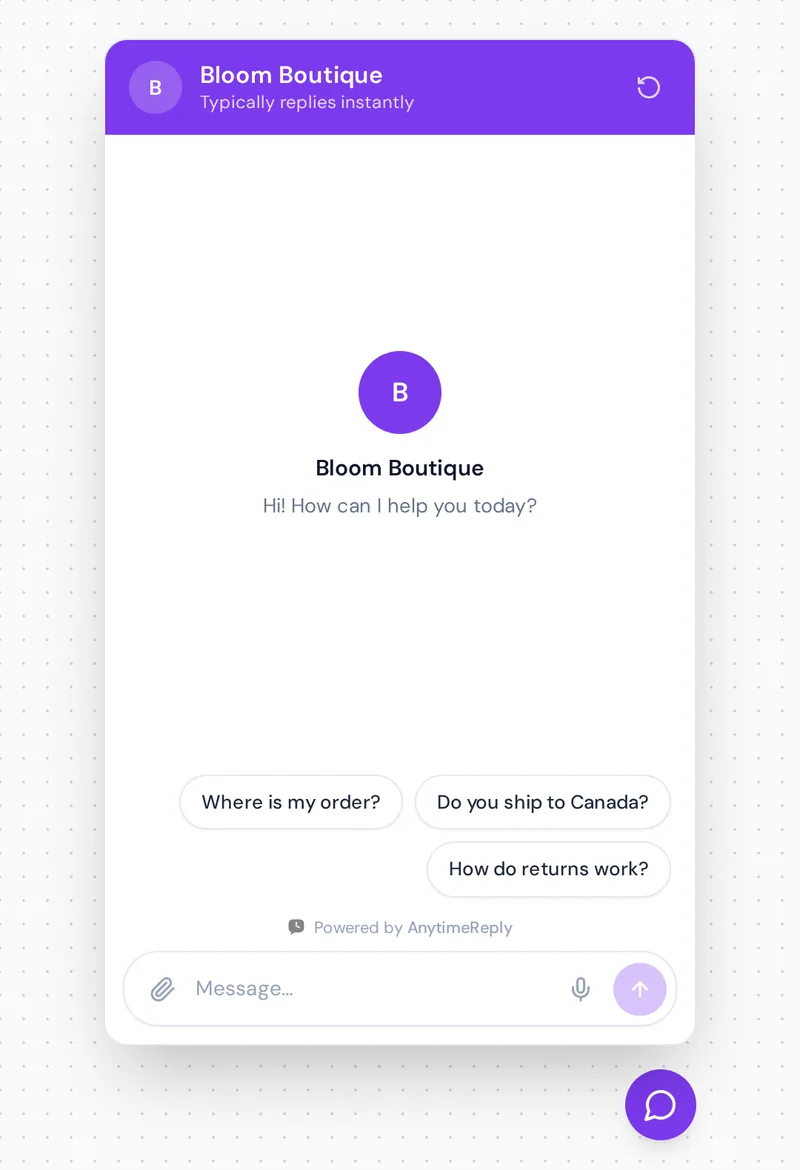
- Write a friendly greeting. "Hi! Ask us anything about orders, sizes or shipping." Clear beats clever.
- Add your top 20 answers. Shipping, returns, payment, opening hours. Use them as saved replies or train the AI on them.
- Set business hours and an offline message. Tell people when a person will reply.
- Connect your messaging channels. WhatsApp, Messenger and Instagram, so everything lands in one inbox.
- Review chats every week. Fix the answers that confused people.
Best practices for using live chat software
- Reply fast, even if it's short. "Let me check that for you" within a minute beats a perfect answer in ten.
- Don't fake being online. If nobody is around, say when you'll reply and collect an email.
- Let AI take the repeat questions. Order status and return policy shouldn't eat your day.
- Hand over cleanly. When a person takes over via live chat, they should see the whole conversation. Customers hate repeating themselves.
Why owners pick AnytimeReply as their customer support software
We built AnytimeReply because most owners can't staff live help around the clock, allowing businesses to answer day and night anyway. It's made for teams that want AI and live support software in one place. The AI agent answers first, from your own website and documents, and says so when it doesn't know instead of guessing. Your customer support team handles the rest from one inbox.
What owners tell us they like: team members are included instead of charged per seat, the free plan is enough to try the whole setup, and it works on the channels their customers actually use, like WhatsApp and Instagram (on paid plans). Read more about the helpdesk and live chat, or see how it works for online stores.
Frequently asked questions
Are there good free live chat tools for small businesses?
Yes. tawk.to is the best known fully free live chat solution for basic needs. If you want to chat with AI-powered answers as well, AnytimeReply's free plan includes site chat, the helpdesk inbox and the AI agent.
Is free live chat software enough?
For low volume, often yes. Once you get dozens of chats a day or want WhatsApp and automation, paid plans usually pay for themselves in saved time.
Which chatbot is best for business?
One that answers from your own content, admits when it doesn't know, and hands over to a person easily. Test any tool with your real customer questions. We explain the trade-offs in chatbot vs live chat.
Do I have to know how to code to install live chat?
No. Most tools give you one line of code to paste, or a WordPress plugin or Shopify app. It takes minutes.
Can I add live chat to non-website platforms?
Yes. Many live chat apps include WhatsApp, Messenger and Instagram in the same inbox as your website. Check that the tool supports the channels your customers use most.
How much does live chat software cost?
It ranges from free to a lot per agent per month. Watch for per-seat pricing and separate AI fees. AnytimeReply is free to start, with paid plans from $9 a month.
Final thoughts
The right live chat app for your business is the one your team will actually use, on the channels your customers already use, at a price that still makes sense in your busiest month. Start simple, add AI for the repeat questions, and keep a real person ready for the rest.
Want to see how AI-plus-human live chat support software helps your team? Start free with AnytimeReply. Add your website, install the chat and invite your team. No card needed.
Published 7 November 2026 by AnytimeReply team