A trial user signs up for your software at 2 am. They get stuck on step three of setup, can't find the answer in your docs, and give up. By the time your team logs in, that trial is already cold. A SaaS chatbot exists to catch that moment: it answers product questions inside your app and on your website, right when people need help.
In this guide we explain what a chatbot for SaaS actually is, the jobs it does well for software companies, where it falls short, how to choose the right one and how to set it up without annoying your users. We build an AI support agent ourselves, so we have a bias, but we'll be honest about the trade-offs.
What is a SaaS chatbot?
The term gets used in two ways, and it helps to separate them:
- A chatbot built for SaaS companies. It sits on your marketing site and inside your SaaS product, answers questions about features, pricing, billing and setup, and passes complex issues to your support team.
- A chatbot sold as SaaS. Chatbot software you rent as a cloud service (software as a service) instead of building it yourself. You sign up, train it on your content and paste a line of code. No servers, no machine learning team.
Most of the time, both are true at once. A SaaS company picks an AI chatbot SaaS platform and uses it to support its own customers. That is the setup this guide focuses on.
Modern versions are AI-powered. They use large language models (generative AI) and natural language processing to understand questions typed the way people really talk, then answer from your own help docs, website and product notes. Older rule-based bots only followed button menus, which is why many people still connect "chatbot" with frustration. Conversational AI changed that. Modern AI chatbot technology lets users ask in their own words, and the bot works out the intent behind each query.
Why SaaS companies need a chatbot more than most businesses
SaaS customer support has a few traits that make AI automation a very good fit. Here is why it pays to use AI here:
- Users are everywhere. Your customers sit in different time zones. Someone is always working while your team sleeps.
- The same customer questions repeat. "How do I invite a teammate?" "Where do I change my plan?" "Do you have an API?" A big share of tickets are answered somewhere in your docs already.
- Response time affects revenue. A trial user who gets unstuck in 30 seconds keeps going. One who waits until tomorrow often doesn't come back, and that shows up later in your SaaS churn rates.
- Support costs grow with users. Every new customer brings new questions. Hiring at the same pace gets expensive fast.
So the goal of a SaaS chatbot is not to replace your support team. It is to take the repetitive questions off their plate and give users real-time help, so your people can focus on bugs, complex setups and accounts that need real attention. Done well, it improves customer satisfaction and the overall customer experience at the same time.
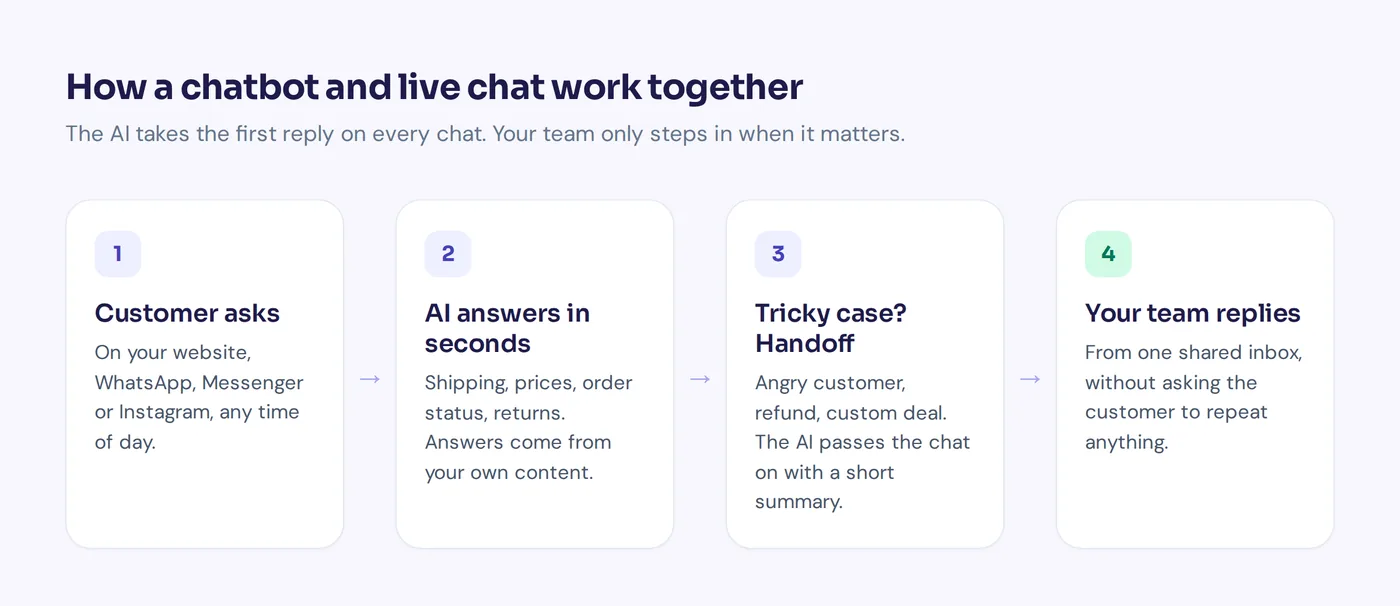
7 SaaS use cases where a bot actually helps
1. Customer support and how-to questions
This is the main job. The bot answers "how do I..." questions from your help center and docs, links to the right article and explains steps in plain words. A good bot also says when it doesn't know, instead of making something up.
2. User onboarding
New users have the most questions in their first week. A chatbot can walk them through first steps, suggest the next feature to try and personalize tips based on their plan or role. That is cheaper and friendlier than a long onboarding email sequence nobody reads.
3. Trial conversion and SaaS sales
Visitors on your pricing page ask things like "Is there a free plan?", "What happens when my trial ends?" or "Do you integrate with HubSpot?". Fast, accurate answers help them decide. The chatbot can also capture leads, push them to your CRM and book a demo with sales for bigger accounts.
4. Billing and subscription questions
Invoices, plan changes, refunds and failed payments make up a lot of SaaS customer service work. With the right chatbot integration, the bot can look up a verified customer's subscription in a tool like Stripe and handle simple requests, with confirmation, while sending refund disputes to a person.
5. Troubleshooting
The bot can ask a few questions ("Which browser? What error do you see?"), suggest fixes from your docs and, if nothing works, create a ticket with all the details so your engineer doesn't need to ask again.
6. Feature discovery and retention
Many churned customers never found the feature they needed. When someone asks "Can I export to CSV?", the AI can say yes and show exactly where. Small moments like that keep accounts around and lift customer engagement.
7. Internal help desk
The same technology works for your own SaaS team: an internal assistant that answers HR and IT questions from your policy docs and Notion pages. It is a nice second use once the customer-facing one works.
Benefits and limits of an AI chatbot for SaaS
Here is an honest look at both sides:
| Where a chatbot helps | Where it falls short |
|---|---|
| Instant answers 24/7, in every time zone | Only as good as your docs. Outdated help articles mean outdated answers |
| Handles many customer interactions at the same time | Not good at angry customers or delicate account issues |
| Cuts repeat tickets and support costs, so the team focuses on hard problems | Needs testing and regular review, it is not "set and forget" |
| Replies in the user's language | Actions like refunds or plan changes need careful limits |
| Shows which questions your docs don't answer | A bad chatbot that loops "I didn't get that" hurts trust |
Our opinion: for most SaaS support teams, the win is not "fewer support people". It is faster first replies, fewer repeat tickets and a clear list of gaps in your documentation.
Choosing the right AI chatbot platform: integration and key features
Not all SaaS chatbots are equal. These are the features that matter most for a software business:
- Training on your own content. Website crawl, help center, PDFs and Notion pages. Your users ask about your product, so the AI must learn from your product docs, not the open internet.
- Answer control. Even advanced AI makes mistakes, so you want a way to write verified answers for sensitive topics (pricing, refunds, security) that always win over other sources.
- Human handoff. A clean way to pass the chatbot conversation to a person, with a summary, when the user asks for one or the AI is unsure.
- A shared inbox or helpdesk integration. Your team needs one support platform to see and reply to customer conversations, or a handover to the help desk you already use, like Zendesk or Intercom.
- CRM and SaaS tools integration. Connections to your CRM, billing and calendar tools, plus webhooks or Zapier for the rest of your workflow.
- Actions for verified users. Checking a subscription, booking a call or updating a record, but only for logged-in, verified users and with limits.
- Analytics and a clear chatbot dashboard. Topics, ratings and a list of questions the AI couldn't answer, so you know which docs to write next.
- Testing. A way to test answers before every change goes live.
- Security basics. Encrypted keys, separate workspaces, and a clear statement on whether your customer data is used to train AI systems.
- Fair pricing. Watch how vendors charge: per seat, per conversation or per AI reply. Usage pricing can be cheap at first and expensive at scale, so do the math with your real chat volume.
Best chatbots for SaaS: leading AI tools compared
The SaaS market for chatbots is crowded, and the right chatbot for one team is wrong for another. Here are a few well-known options and who they suit. AI SaaS products change fast, so check each vendor's pricing page for current features and prices.
| Tool | Known for | Best for |
|---|---|---|
| AnytimeReply | AI agent plus built-in helpdesk, trained on your site, docs and Notion, with handoff to your team | Small and mid-sized SaaS teams that want AI answers and a shared inbox in one place |
| Intercom | Customer messaging suite with its Fin AI agent | Larger SaaS companies already using Intercom |
| HubSpot | HubSpot's chatbot builder inside its CRM | Teams that live in HubSpot and mainly want lead capture |
| Zendesk | Ticketing with AI automation on top | Support teams with a big Zendesk setup |
| Chatbase | Quick AI chatbot trained on your documents | Simple website Q&A bots |
Which is the best AI chatbot SaaS option depends on your stack. If you already pay for a big suite with the best live chat and AI add-ons, its built-in bot may be enough. If you want something lighter and faster to set up, a dedicated AI-powered chatbot is often the best for SaaS teams that want quick results.
How to deploy a chatbot for your SaaS business
- List your top 20 to 30 questions. Look at old tickets, chats and sales emails. These are what the AI must answer well on day one.
- Fix the docs first. Building a chatbot on bad docs gives bad answers. If the answer to "How do I cancel?" isn't written anywhere clearly, no AI can give it. Update pricing, billing and setup pages before you train anything.
- Train the AI. Connect your website, help center, docs and any internal notes. Add written Q&A for sensitive topics.
- Set the rules for handoff. Decide when a human takes over: angry users, refund disputes, security questions, enterprise deals.
- Test with real questions. Use the exact wording from old tickets, including typos and vague ones. Check that it says "I don't know" when it should.
- Launch on one page first. Start with your help center or pricing page, then add it inside the app once you trust it.
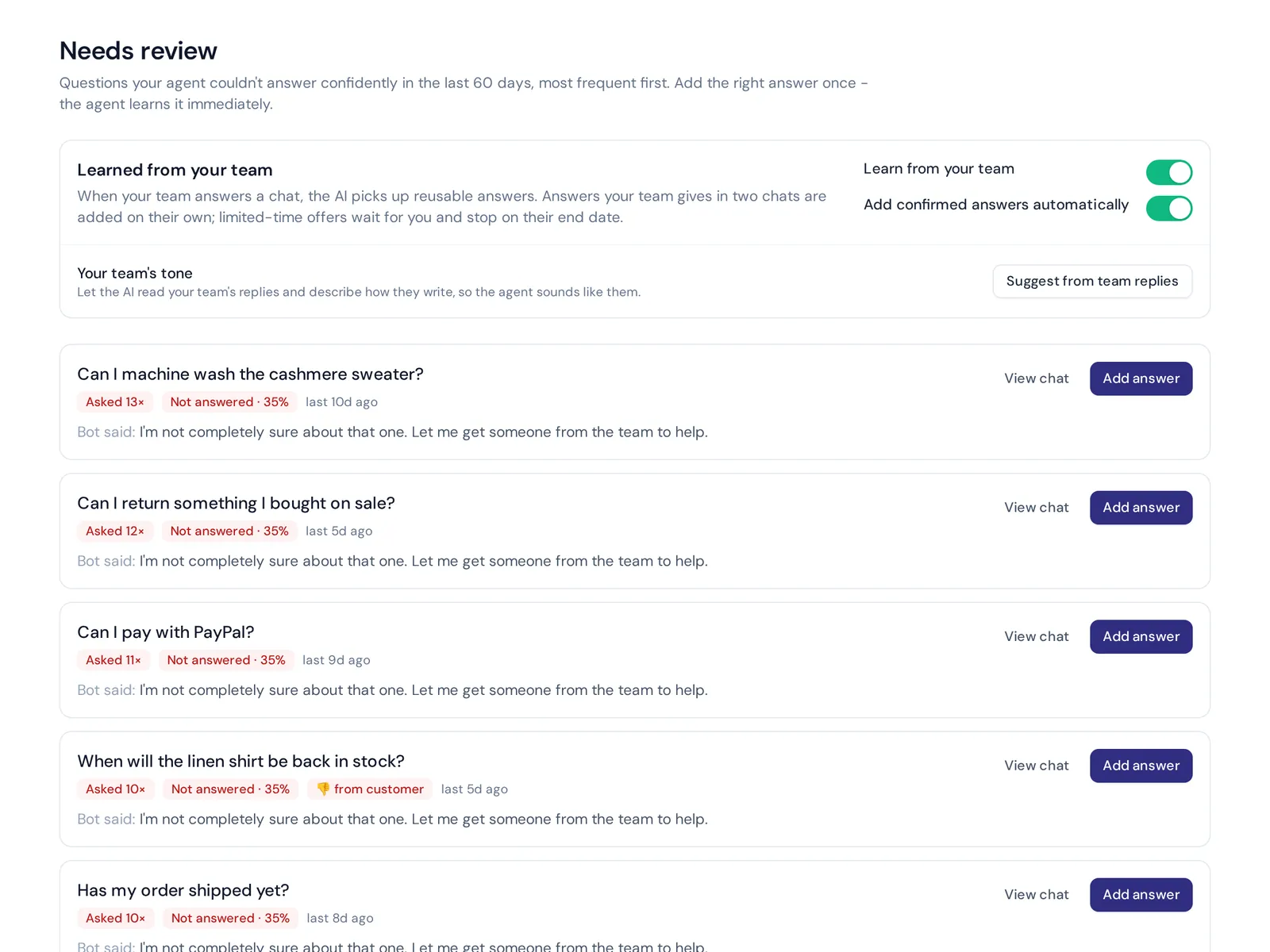
- Review weekly. Read a handful of conversations, check unanswered questions and add missing answers. Ten minutes a week makes a big difference.
Measuring chatbot success and ROI
Chatbot ROI is simple to think about: how much support work does it take off your team, and does it help more trials convert? Track a few numbers from your analytics:
- Resolution rate. How many conversations end without a human. Look at the real chats, not just the number.
- Handoff rate and reasons. Why users ask for a person tells you what to fix.
- First response time. It should drop to seconds for most questions.
- Ratings. Thumbs up/down or CSAT after the chat.
- Unanswered questions. Your to-do list for new docs.
- Trial conversion and user behavior. Do users who chat during the trial convert better? Compare before and after launch.
Say you get 1,000 chats a month and the AI handles half of them well. That is 500 conversations your team doesn't have to type, every month. Use your own numbers, but that is the kind of math that decides whether the power of AI actually pays off for you.
Example chatbot conversations for SaaS
Here is what good answers look like. Use these as a guide when you write your own Q&A.
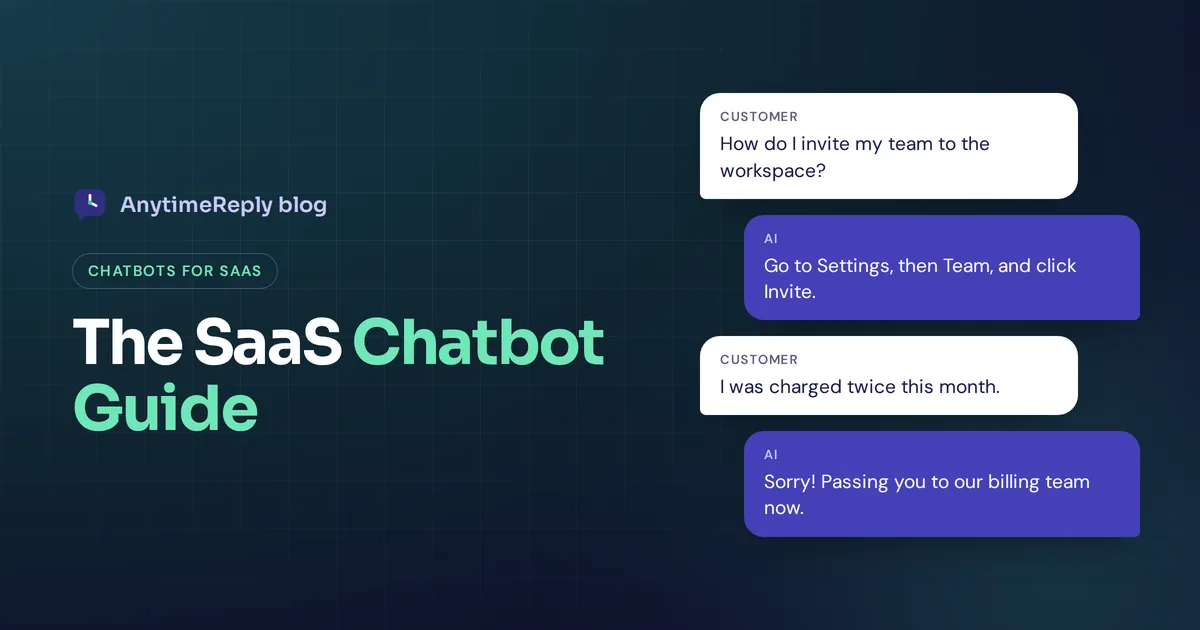
User: How do I add my team to the workspace?
AI: Go to Settings, then Team, and click Invite. You can add up to the number of seats on your plan. Want me to show you how roles work too?
User: What happens when my trial ends?
AI: Your account moves to the free plan and your data stays. You can upgrade any time from Billing. Want a quick comparison of the plans?
User: I was charged twice this month, this is ridiculous.
AI: Sorry about that, I understand why you're annoyed. I'm passing this to our billing team now with your account details, so you won't need to explain it again.
Notice the last one. The AI doesn't try to argue or fix a billing error on its own. It apologizes and hands over. That is the right behavior.
Mistakes to avoid when using AI chatbots for SaaS
- Hiding the human. If users can't reach a person, they get angry. Always offer a clear path to your team.
- Training on everything. Old blog posts and outdated release notes confuse the AI. Prioritize current docs and pricing pages.
- Letting the AI promise things. Discounts, refunds and roadmap dates should come from verified answers or a person, not from the model's best guess.
- Popping up too much. A proactive message on the pricing page can help. A popup on every page of your app is noise.
- Never looking at the data. The unanswered questions list is basically a free to-do list for your documentation team.
How AnytimeReply works as a chatbot for SaaS customer support
AnytimeReply is a chatbot SaaS solution: an AI customer support agent with a built-in helpdesk. For software companies, the setup looks like this:
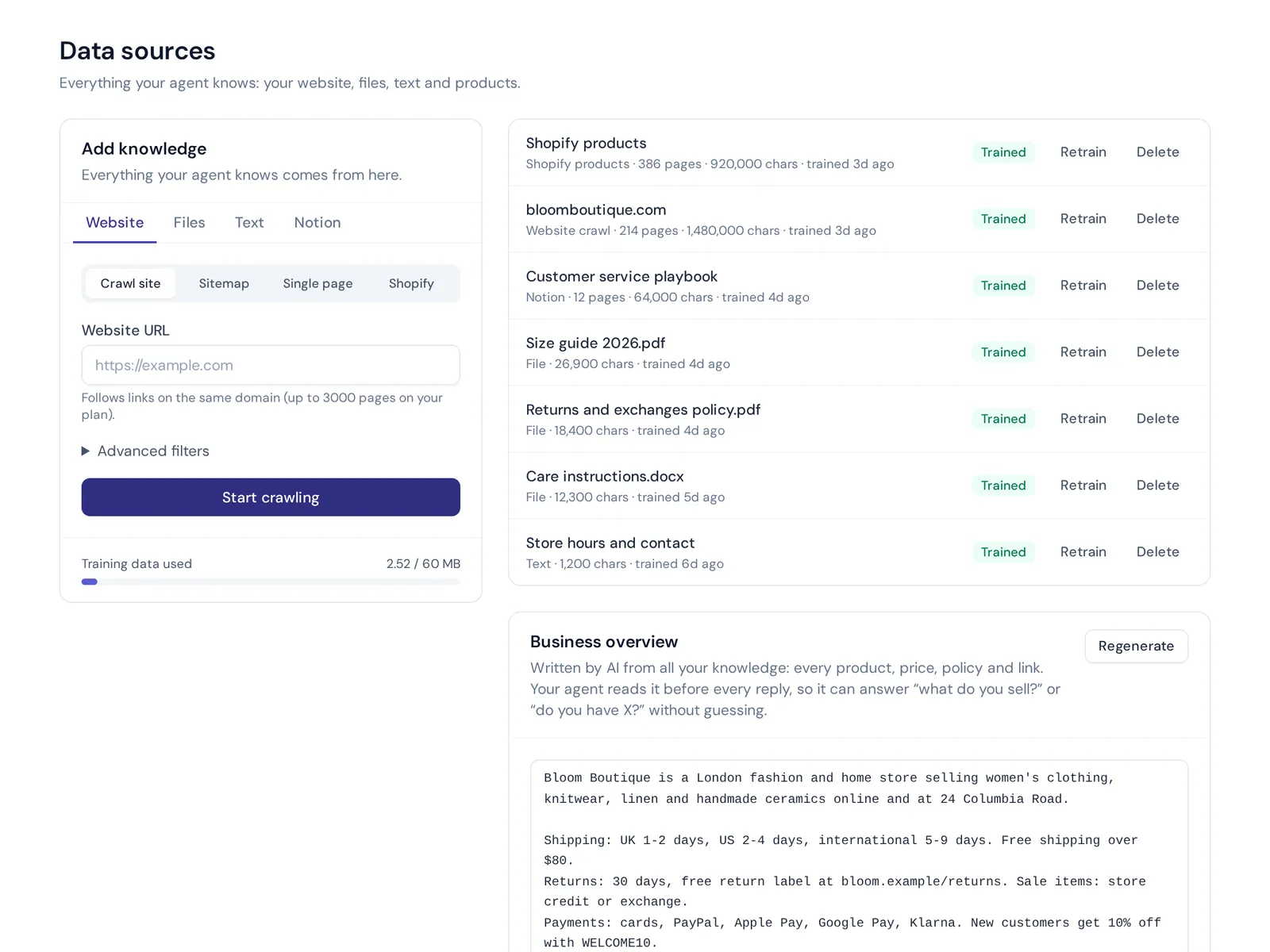
- Train it on your product. Add your website or sitemap, PDF and Word docs, pasted text and Notion pages. Q&A you write always wins over other sources. See training and knowledge.
- Honest answers. Answers come with a confidence score, and when the AI doesn't know, it says so instead of guessing.
- Actions for verified users. On paid plans it can work with tools like Stripe, HubSpot, Cal.com, Calendly or any API with an OpenAPI file, only for verified customers and with confirmation and limits.
- One inbox for your team. Website chat, email tickets, Slack and messaging channels land in one shared helpdesk, with handoff summaries. Or hand chats over to Zendesk, Freshdesk, Intercom, Zoho Desk, Help Scout or Gorgias.
- Find gaps. Analytics shows topics, ratings and questions it couldn't answer, with one-click "add answer".
Where it is not the right fit: if you need phone or voice support, or a native mobile SDK for your iOS or Android app, AnytimeReply doesn't offer those. The website widget, email, messaging channels and API are where it works.
The Free plan covers website chat, the helpdesk inbox, a help center, flows, tests and analytics, so you can try it on your own docs before paying. Paid plans start at $9 a month (prices can change, check pricing). More detail on our SaaS use case page.
Frequently asked questions
What is a SaaS chatbot?
It is a chatbot that a software company uses to support its users, usually delivered as a cloud service. It answers questions about features, setup, pricing and billing on the website and inside the product, and hands complex issues to people.
Do AI chatbots work for B2B SaaS?
Yes. B2B users ask a lot of detailed setup, integration and billing questions, which an AI trained on good docs handles well. Big contract questions and custom deals should still go to sales.
Can a chatbot replace my support team?
No, and it shouldn't try. It can take a large share of simple questions, but bugs, billing disputes and upset customers still need humans. Think of it as your first line, not your whole team.
Can AI chatbots integrate with my SaaS CRM?
Most platforms can, either directly (HubSpot is a common one) or through webhooks, Zapier, Make or n8n. Check that the chatbot can both read customer data and send new leads back.
How much do SaaS chatbots cost?
It ranges from free plans to enterprise contracts. Pricing is usually per seat, per conversation or per AI reply. Estimate your monthly chat volume and compare the real cost on each vendor's pricing page.
How do I stop a chatbot from giving wrong answers?
Train it only on current docs, write verified Q&A for sensitive topics, test before changes go live and pick a tool that admits when it doesn't know. Then review unanswered questions every week.
Final thoughts
A good chatbot for SaaS answers the 2 am question, unblocks the trial user and shows you exactly which docs are missing. A bad one hides your team behind a loop. The difference is mostly in the setup: clean docs, clear handoff rules and a weekly review.
If you want to try it on your own product, start free with AnytimeReply. Add your docs, test the agent and connect your inbox. No card needed.
Published 6 November 2026 by AnytimeReply team