Most FAQ sections have the same problem. The answer is in there somewhere, but the customer has to scroll, guess which heading it sits under and read three paragraphs to find one line. So they give up and send you an email instead. Or worse, they leave.
A FAQ chatbot fixes that. The customer types their question in their own words, and the chatbot replies with the right answer in a few seconds, day or night. In this guide we explain how FAQ chatbots work, the main types, real examples for different businesses, what they cost and how to build one step by step.
What is a FAQ chatbot?
A FAQ chatbot is a chat assistant that answers common customer questions automatically. It usually lives in a chat widget on your website, but it can also reply on WhatsApp, Facebook Messenger, Instagram or email.
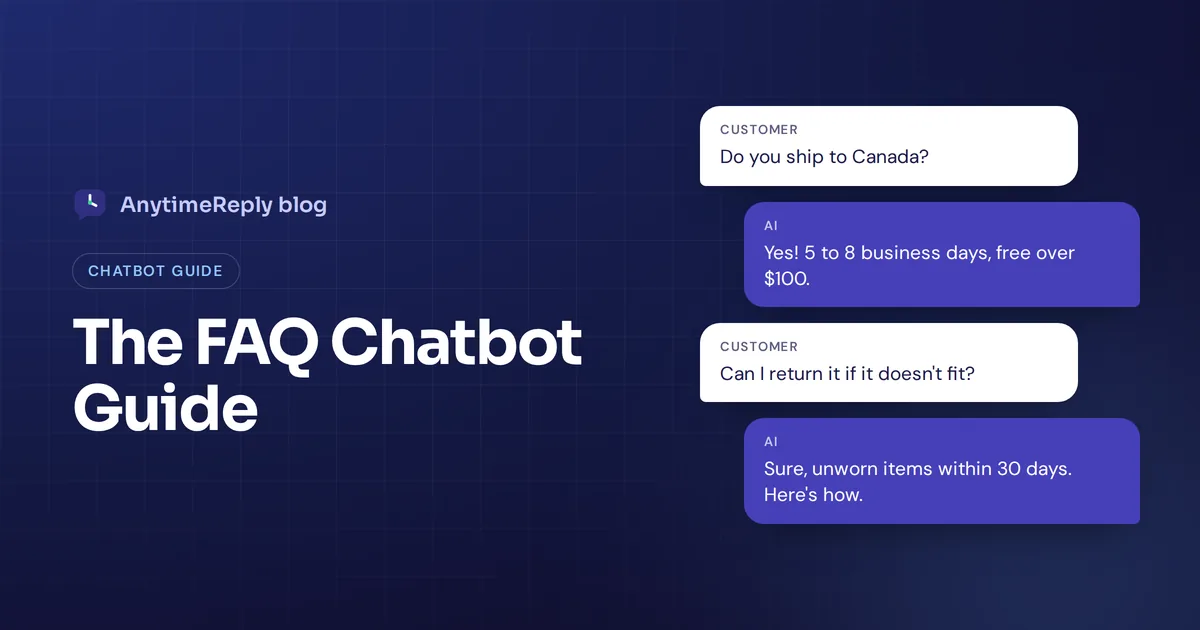
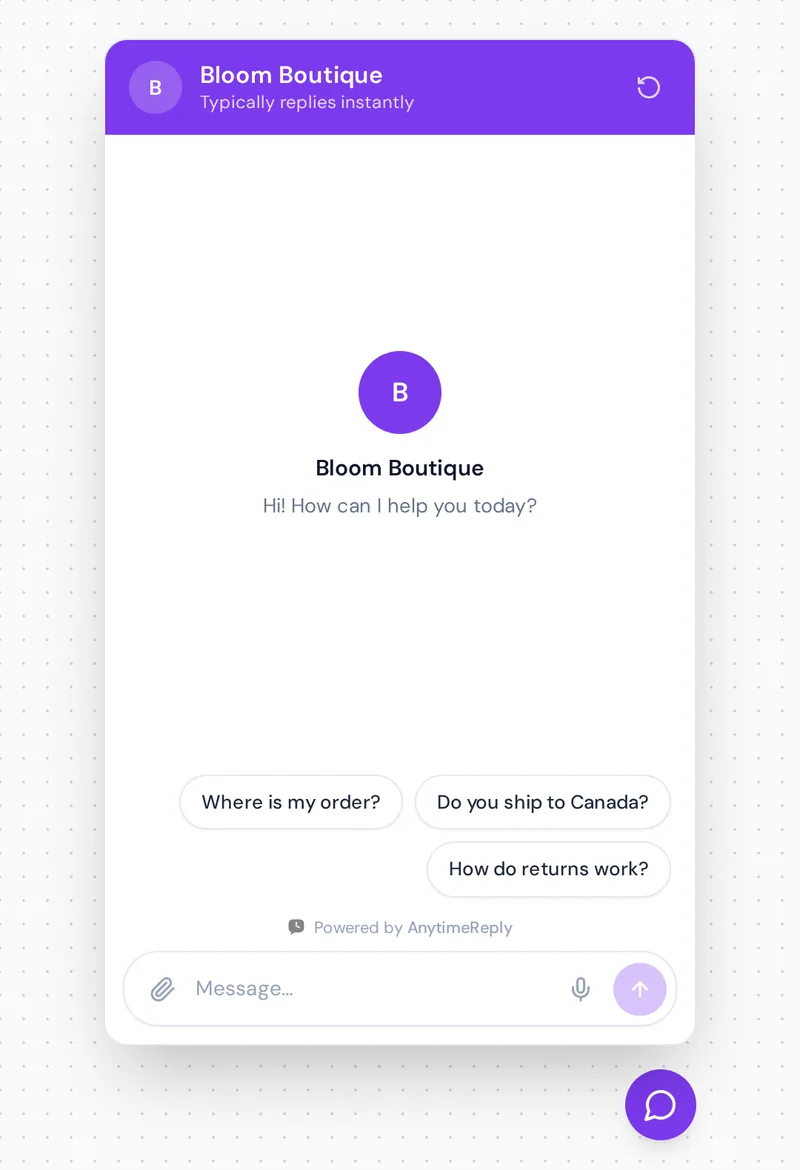
Instead of making customers search a long list of FAQs, the chatbot meets them where they already are. They ask "Do you ship to Canada?" and get "Yes, we ship to Canada in 5 to 8 business days" back. No scrolling, no clicking through categories.
A good FAQ bot does three jobs:
- Answers common questions about shipping, returns, pricing, opening hours, accounts and so on.
- Points people to the right article when a longer answer lives in a help guide or policy.
- Hands the chat to a person when the question is new, personal or emotional.
So what does FAQ stand for? Frequently asked questions. And that's the whole idea: the same 20 or 30 questions make up a big share of most support inboxes, so it makes sense to automate them.
How FAQ chatbots work: AI, NLP and RAG
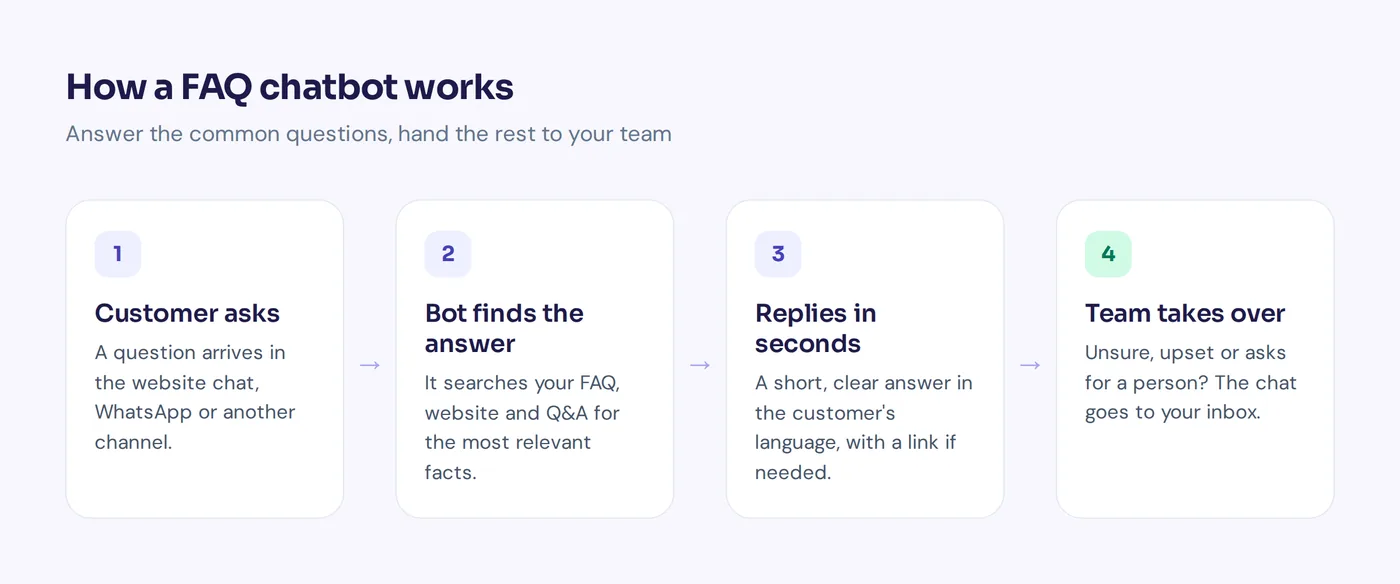
Every FAQ chatbot follows the same basic loop. A customer sends a message (the query). The chatbot works out what they mean, finds the matching information and sends back an answer.
The difference is in the middle step. Older chatbots match buttons or keywords. Modern AI chatbots use natural language processing (NLP) to understand the meaning of a question, even with typos, slang or a different language.
Most modern FAQ chatbots use a method called retrieval-augmented generation, or RAG. In plain words:
- Retrieval: the chatbot searches your knowledge base (your website, help articles, policies and Q&A) for the parts that match the question.
- Generation: a large language model (generative AI) reads those parts and writes a short, natural reply.
Because the answer comes from your own content, not from the open internet, you get accurate answers about your prices and policies. It also means a FAQ chatbot can answer questions that aren't written word for word in your FAQ list, as long as the information exists somewhere in its sources.
The risk with AI is that a badly set up bot can guess. The fix is to train it only on your own content, tell it to say "I don't know" when the answer isn't there, and give it an easy way to hand over to your team.
Types of FAQ chatbots and use cases
There are many types of chatbots, but for FAQs three main types matter. They look the same to the customer, but they work very differently.
1. Rule-based chatbot (decision tree)
A rule-based chatbot follows a script. You build a decision tree with buttons like "Shipping", "Returns" and "My account". The customer clicks and sees a fixed answer.
These are predictable and cheap. But a rule-based bot can't handle anything outside the script.
2. Keyword-based chatbot
This type scans each message for certain words. If the message contains "refund", it shows the refund answer. Better than buttons alone, but fragile. "Can I send this back if it doesn't fit?" might not trigger your "refund" rule at all.
3. AI FAQ chatbot
This type of bot needs a predefined knowledge base, your own content. It can use NLP and advanced AI models to understand the question and write a reply from your content. Customers can ask the same thing ten different ways and still get the right answer. Many also reply in the customer's language, which matters a lot if you sell across countries.
Most good setups today are a mix: AI for open questions, plus a few buttons as shortcuts ("Track my order") so people don't have to type.
| Rule-based | Keyword-based | AI FAQ chatbot | |
|---|---|---|---|
| How customers ask | Click buttons | Type, must use the right words | Type naturally, in their own words |
| Setup | Build every path by hand | List keywords and answers | Add your site, docs and Q&A, then test |
| Unplanned questions | Fails or loops | Often misses | Answers if the info exists, hands over if not |
| Languages | One script per language | One word list per language | Often replies in the customer's language |
| Maintenance | Edit the tree for every change | Keep word lists updated | Update your content and retrain |
| Best for | Tiny, fixed menus | Simple FAQ sets | Most businesses with real questions |
Benefits of FAQ chatbots
- Answers 24/7. The shop owner is asleep at 2 am. The bot isn't. Customers in other time zones get help right away.
- Fewer repeat tickets. If half your inbox is "where is my order" and "how do returns work", automation takes that load off your team so they can focus on the tricky cases.
- Faster replies. A few seconds instead of a few hours. For a customer deciding whether to buy, that speed can make the sale.
- Better user experience. People get a direct answer instead of hunting through a wall of text.
- Consistent answers. Every customer gets the same return policy, not a slightly different version from each agent.
- Scales without hiring. A busy sale weekend with three times the questions doesn't need three times the staff.
- Insight into what people really ask. Chat logs show the gaps in your FAQ content. That's gold for your content and your product.
The downsides are real too. A chatbot can't make judgment calls, calm an angry customer or approve an exception. And one trained on outdated content will give outdated answers. So treat it as your first line of customer support, not your only one.
FAQ chatbot examples and use cases
Here are examples you can borrow. Each shows a use case and a sample answer. Adapt the wording to your own business.
Online store
Customer: Do you ship to Canada?
Chatbot: Yes! Standard shipping to Canada takes 5 to 8 business days and costs $12. Orders over $100 ship free. Want me to check delivery for a specific product?
Customer: can i return a dress if it doesnt fit
Chatbot: Of course. You can return unworn items within 30 days for a full refund. Start your return from your order history, and we'll email you a free return label.
SaaS company
Customer: How do I cancel my subscription?
Chatbot: Go to Settings, then Billing, then Cancel plan. Your account stays active until the end of the billing period. If something isn't working for you, I can connect you with our team first.
Customer: What's the difference between your plans?
Chatbot: The Starter plan covers one user and basic reports. Team adds 10 users and integrations. Here's the full comparison: [link]. Which one sounds closer to what you need?
That second one is a "pricing FAQ", and it's one of the most valuable questions to automate, because the person asking is close to buying.
Service business (clinic, salon, agency)
Customer: Are you open on Sunday?
Chatbot: We're open Sunday from 10 am to 4 pm. Would you like to book a time?
Education
Customer: When does the next course start?
Chatbot: The next intake starts on March 3. Applications close two weeks before. I can send you the application link.
Internal HR or IT help desk
Employee: How do I reset my VPN password?
Chatbot: Open the IT portal, choose Accounts, then Reset VPN password. If you're locked out completely, I'll pass you to the IT team.
Notice the pattern. Each answer is short, gives the actual fact and offers a next step. That's what makes a FAQ bot feel helpful instead of robotic.
How to build an FAQ chatbot in 7 steps
You don't need to code to build a chatbot for FAQs. Here's the process we recommend.
- Collect your real questions. Go through the last few months of emails, chats, DMs and support tickets. Write down the top 20 to 50 customer questions. Your existing FAQ list is a start, but customers often ask things they don't cover.
- Write clear answers. One question, one short answer. Include the facts: prices, days, links, conditions. Avoid "it depends" without saying what it depends on.
- Pick a chatbot platform. Every chatbot needs a good home. Look for one that learns from your website and documents, lets you write verified Q&A pairs, and has a human handoff built in. Check the channels you need and whether it installs on your site easily, for example with a WordPress plugin or one line of code.
- Train it on your knowledge base. Add your website, help articles, PDFs and Q&A list. The cleaner your FAQ data, the better the answers.
- Set the tone and limits. Give it a short greeting and basic instructions: be friendly, keep answers short, never make up prices, hand over when unsure.
- Test it with real questions. Ask the 50 questions from step 1, plus messy versions with typos and slang. Fix wrong or vague answers by improving the source content.
- Launch, then review weekly. Add the widget to your site, watch the questions it couldn't answer and add those answers. It gets better every week you look after it.
Some companies with developers build a custom FAQ chatbot from scratch with an LLM API and their own search setup. That gives full control but takes real engineering time to build and maintain. For most small and mid-size teams, a ready-made platform is the faster and cheaper way to create an FAQ chatbot. The best FAQ chatbots are rarely the most custom AI builds. They're the ones with clean content and someone reviewing them every week.
FAQ chatbot vs a static FAQ page
Should you put a chatbot on your FAQ page, or replace it? Put one there, but don't delete the FAQ section. They help different people.
| Static FAQ | FAQ chatbot | |
|---|---|---|
| Finding an answer | Scroll, scan and read | Ask and get the answer |
| Wording | Must match your headings | Any wording, any language (AI) |
| Follow-up questions | Not possible | Yes, in the same chat |
| Search engines | Indexed and can rank | Chat replies aren't indexed |
| Handoff to a person | Contact form or email | Right inside the chat |
Some people like to read the whole policy before they buy. Search engines read that text too. And the bot uses the same content as a source, so it does double duty.
A simple setup that works well: keep a clean FAQ section or knowledge base, put the chat widget on every part of your site (not just the FAQ section), and add a line at the top like "Can't find it? Ask our assistant."
How much does an FAQ chatbot cost?
It ranges from free to a lot. Roughly, you'll see three models:
- Free plans: many platforms offer a free tier with limited messages, good for testing or very small sites.
- Monthly subscriptions: usually based on messages, AI replies or seats. Small businesses often pay somewhere in the tens of dollars per month.
- Custom builds: developer time plus AI model costs plus hosting. Flexible, but the cost is mostly in building and maintaining it.
When you compare, look past the headline price. Ask how AI replies are counted, whether team seats cost extra and which channels are included.
Best practices for writing FAQ answers a chatbot can use
- Use the customer's words. Write "Where is my order?" not "Order fulfillment status inquiries".
- Put the answer first. "Yes, we ship to Canada." Then the details.
- One topic per answer. Don't mix shipping and returns in one block.
- Keep facts in one place. If your return window changes, update your knowledge base everywhere, or the chatbot may find the old number.
- Add the edge cases. Sale items, international orders, gift cards. These are exactly what customers ask about.
- Avoid generic FAQ filler. "We value your satisfaction" isn't an answer. Every FAQ answer should contain a fact.
- Link to the full policy. Short answer in chat, full details one click away.
Common mistakes with FAQ chatbots
- No way to reach a human. Nothing annoys customers faster than a bot that loops. Always offer a person.
- Training on old content. If your website is out of date, the bot will be too.
- Answers that are too long. Chat is not an essay. Two or three sentences, then a link.
- Pretending to be human. Say it's an assistant. Customers are fine with that when the answers are good.
- Set and forget. Products, prices and policies change. Review chats at least once a week.
How to measure if it's working
You don't need a big dashboard. Watch a few numbers and read some real conversations:
- Resolution rate: how many chats end without needing a person.
- Handoff rate and reasons: which topics keep going to your team.
- Unanswered questions: what customers asked that it couldn't answer.
- Ratings: thumbs up or down, or a short satisfaction score after the chat.
- Ticket volume: are fewer repeat emails reaching your inbox?
If one topic keeps getting handed over, either add a better answer or decide it should always go to a human. Both are fine choices.
Using AnytimeReply as an AI chatbot and agent for FAQs
AnytimeReply is an AI agent with a built-in helpdesk, so it covers the FAQ job and the handoff in one place. Here's what that looks like in practice:
- Train it on what you already have. Add your website, PDFs, Word files, Notion pages or Shopify products. See training and knowledge.
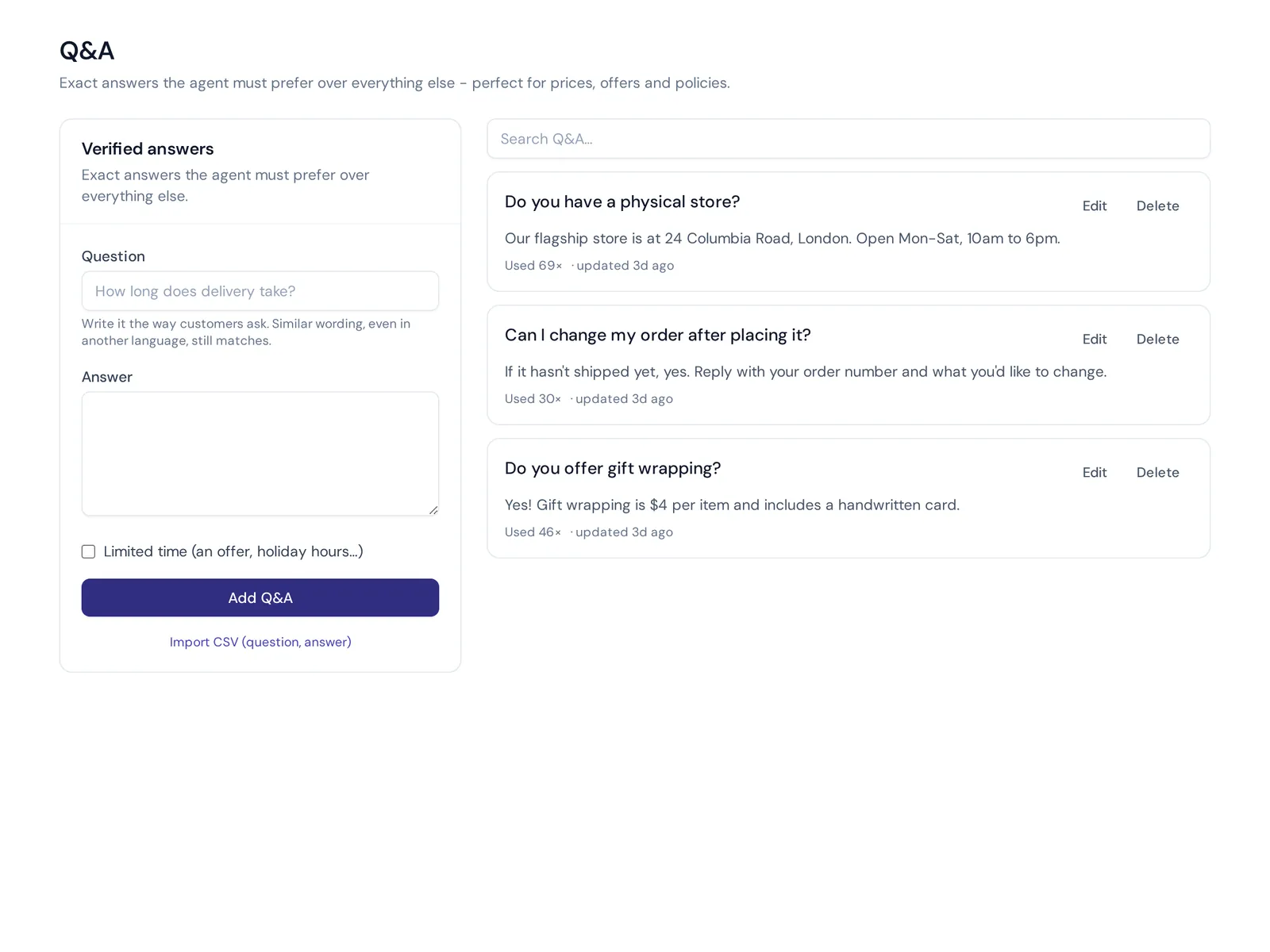
- Write verified Q&A. Questions and answers you write always win over other sources, so your refund policy is quoted exactly.
- It says when it doesn't know. Answers come with a confidence score, and when the answer isn't in its knowledge it says so instead of guessing.
- Publish a help center. Turn the agent's knowledge into articles on your own domain, with AI search that answers instead of listing links. See help center.
- Fill the gaps. Analytics show the questions it couldn't answer, with one click to add an answer.
- Hand over with a summary. When a customer asks for a person or gets upset, the chat moves to your shared inbox.
It replies in the customer's language, including Bangla, Banglish, Hindi and Hinglish, and installs on your site with one line of code, a WordPress plugin or a Shopify theme. The Free plan includes website chat, the helpdesk inbox, Q&A and analytics, so you can test a FAQ chatbot on your own site first. WhatsApp, Messenger, Instagram and email start on paid plans; see pricing.
Where it's not the right fit: if you only have five questions and they never change, a simple FAQ list might be enough. And it doesn't handle calls or text messages, so it won't help if your customers mostly ring you.
Frequently asked questions
What is a FAQ chatbot?
It's a bot that answers your most common questions automatically, usually on your website or messaging apps. Customers type a question and get an instant answer from your own content.
Is there a free AI chatbot for answering questions?
Yes. Many platforms have free plans. AnytimeReply has a free forever plan with 50 credits a month, website chat and Q&A, which is enough to build and test a small FAQ chatbot.
Can ChatGPT be used as an FAQ chatbot?
ChatGPT on its own doesn't know your prices or policies. You need a chatbot that's trained on your own content, so it answers from your knowledge base instead of general internet knowledge.
Can an FAQ chatbot answer questions that aren't in my FAQ list?
An AI one can, if the answer exists in its other sources, like your website or documents. If the information isn't there, a good chatbot should say so and offer a person.
Can a FAQ chatbot learn on its own?
Not fully, and you wouldn't want it to. The best setups show you the questions it couldn't answer, so you add the right answer once and it uses it from then on.
Will a FAQ chatbot replace my support team?
No. It takes the repeat questions off their plate. Your team still handles complaints, exceptions and anything that needs judgment.
Final thoughts
A FAQ chatbot is one of the easiest wins in customer support. Collect your real questions, write clear answers, train it on your content and always leave a door open to a person. Then review it every week.
Want to see it on your own site? Start free with AnytimeReply, add your website and FAQs, and test the agent in a few minutes. No card needed.
Published 5 November 2026 by AnytimeReply team