Most support teams don't start with a system. They start with a shared Gmail inbox, a WhatsApp number on someone's phone and a spreadsheet. It works until it doesn't: two people answer the same customer, a refund request sits unread for four days, and nobody can say how many complaints came in last week.
A customer service management system fixes that. It pulls every customer conversation into one place, turns each request into something you can assign, track and close, and gives you the numbers to see what's going on. The good ones now add AI that answers the easy questions before your team even sees them.
In this guide to customer service management, you'll learn what customer service management systems do, the main types, how they differ from a CRM, the features that matter, and how to choose and set one up without wasting months. We make one (AnytimeReply), so we'll be upfront about where it fits and where something else might suit you better.
What is a customer service management system?
A customer service management system is software that helps a business receive, organize, answer and track customer requests across every channel. Email, live chat, WhatsApp, social media messages and sometimes phone calls all land in one workspace instead of scattered apps.
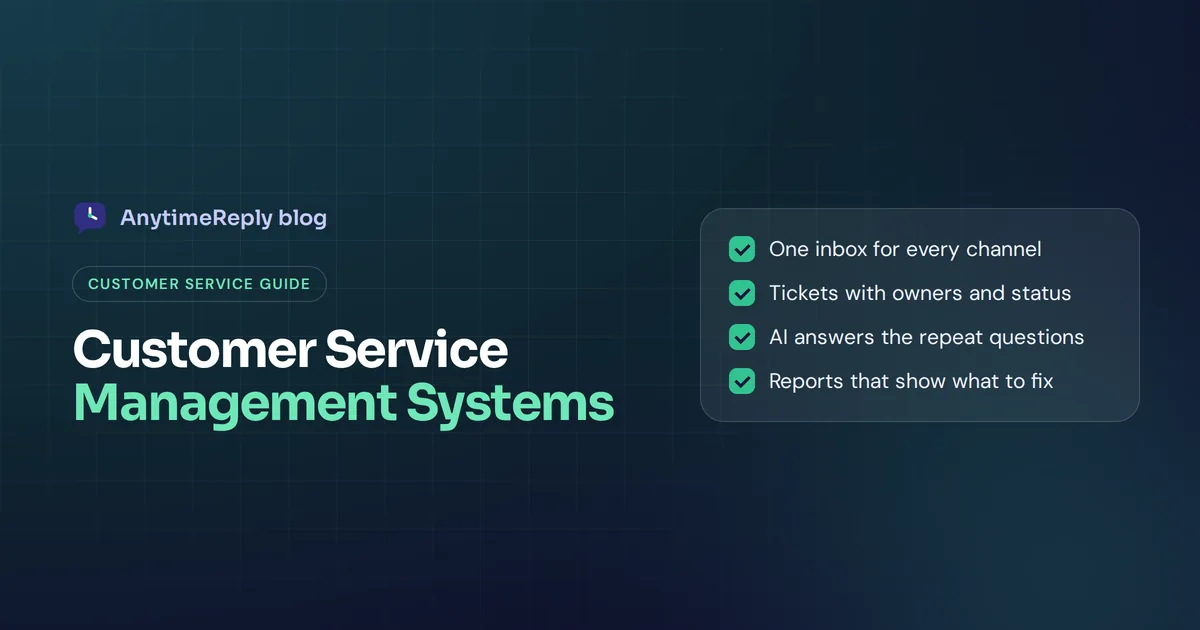
At its core, it does four jobs:
- Collect every customer interaction in one shared inbox.
- Organize requests as tickets or cases with an owner, a status and a priority.
- Answer faster with templates, a knowledge base, automation and AI.
- Measure response times, volume, customer satisfaction and team workload.
You'll also hear it called customer service software, help desk software, a ticketing system or a customer support platform. The names overlap a lot. What matters is whether the tool covers the jobs above for the channels your customers use.
And it's more than software. Customer service management is the whole practice of how your service team handles customer inquiries: the process, the people and the tools. The system is the part that keeps it organized.
Signs your customer service team needs a system
You probably need one if any of these sound familiar:
- Customers have to ask twice because the first message got lost.
- Two team members reply to the same customer with different answers.
- You can't tell which requests are still open without scrolling through inboxes.
- Support lives on personal phones and personal accounts.
- The same 20 questions eat most of your team's day.
- Your manager asks "How fast do we reply?" and nobody knows.
If you get a handful of messages a week, a shared inbox is fine. Once more than one person answers, or you're on more than one channel, a proper system pays for itself in saved time and fewer angry customers.
Key features of customer service management software
Shared inbox and omnichannel support
All channels in one place: email, website chat, WhatsApp, Messenger, Instagram and more. Agents see the full customer history, no matter where the customer wrote from. That means you can manage customer interactions across multiple channels without switching apps. Everything else depends on this feature.
Ticketing and case management
Every request becomes a ticket (some tools call it a case) with a status such as open, pending or solved, a priority and an owner. Case management stops a customer issue from falling through the cracks, and it makes handovers between shifts painless.
Routing and assignment
Rules decide who gets what. Billing questions go to the billing team, angry customers go to a senior customer service agent, and new chats are split fairly using round robin or least busy assignment.
Automation and workflows
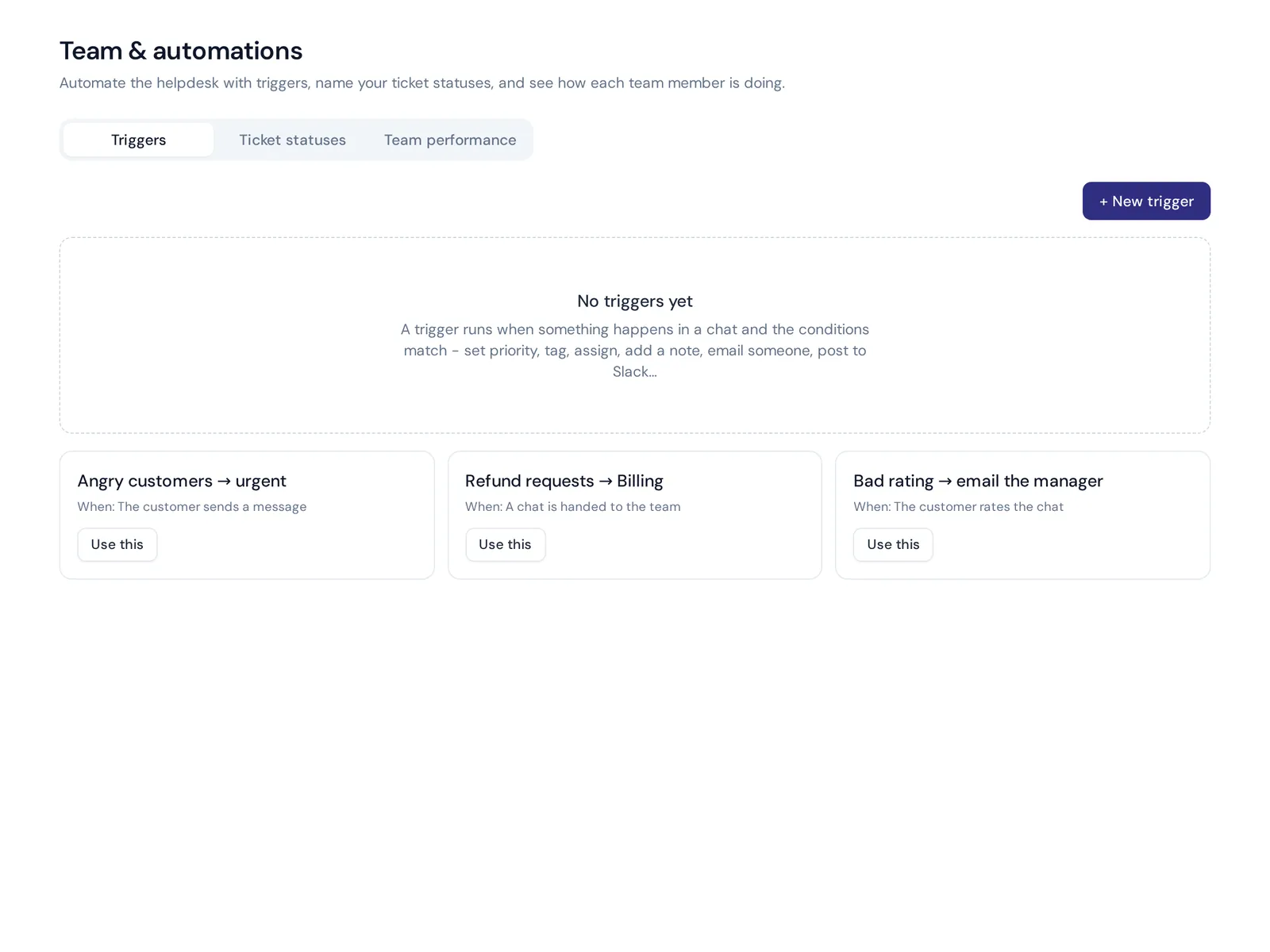
Triggers and macros handle the repetitive work: tag a ticket, set priority, send a canned reply, close stale tickets, alert a manager when a customer leaves a bad rating. This is how a small team keeps up with a growing volume of customer requests.
AI agents and assistants
Modern customer service systems include AI that answers common questions on its own, drafts replies for agents, summarizes long threads and translates messages. It's the biggest change in the category over the last few years.
Knowledge base and customer self-service
A help center or customer portal with articles people can search, so they find answers without contacting you. Good customer self-service cuts ticket volume and is available at 2 am. The same content usually trains the AI.
Customer profiles
Contact details, past conversations, orders and custom attributes in one view of the customer, so agents don't ask people to repeat themselves. Some systems include a light CRM; others connect to yours.
Reporting and analytics
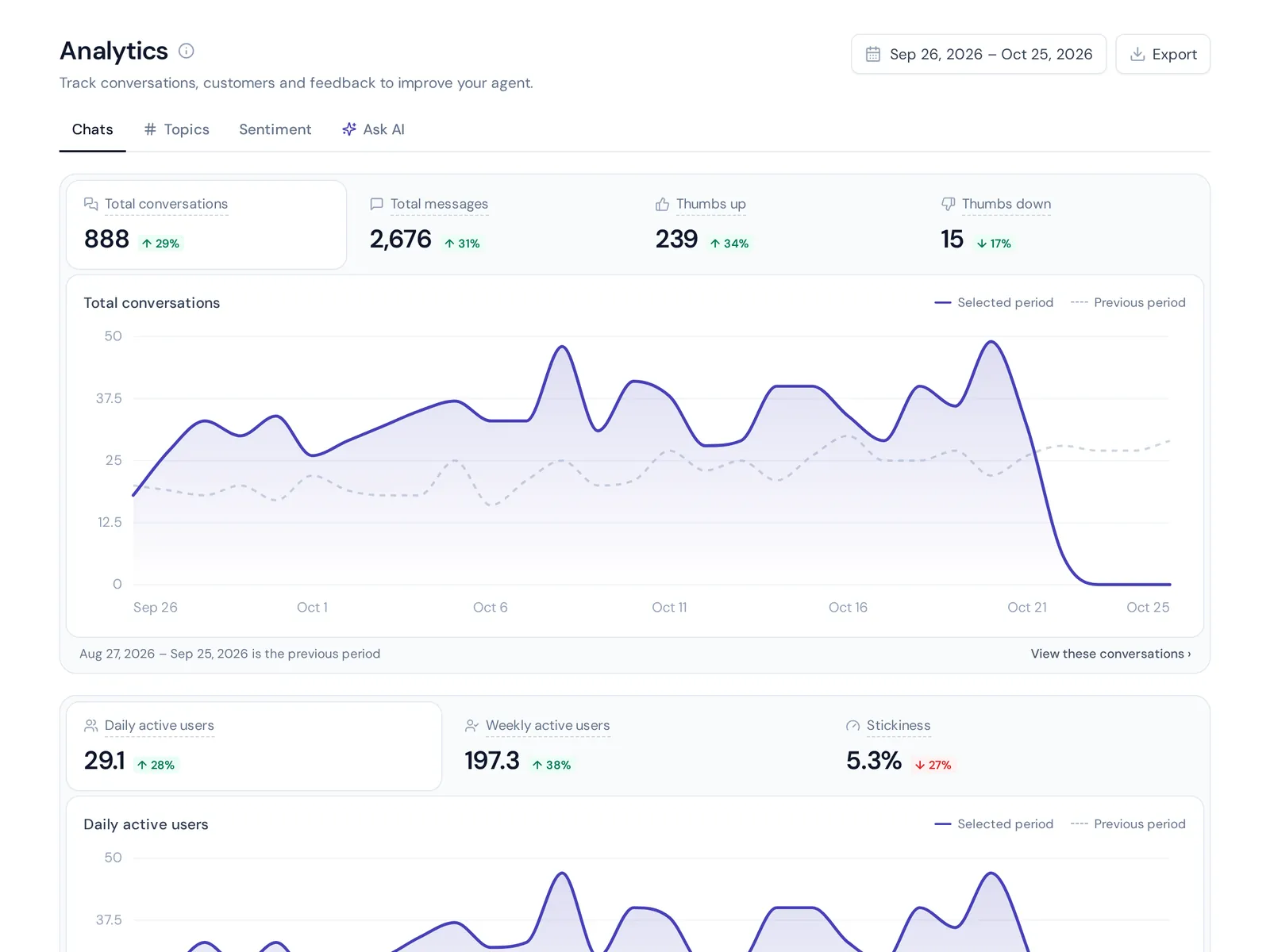
First response time, resolution time, volume by channel and topic, customer satisfaction scores (CSAT) and agent performance. You can't improve service quality you can't see.
Integrations
Connections to your store, billing, CRM, Slack and other tools, so agents can check an order or refund a payment without switching tabs.

Types of customer service systems
| Type | What it does best | Good for |
|---|---|---|
| Help desk / ticketing system | Turns emails and forms into tracked tickets | Teams with lots of written customer support |
| Live chat and messaging platform | Real-time chat on website and messaging apps | Online shops, sales-heavy teams |
| Omnichannel customer service platform | Chat, social, messaging and mail in one inbox | Growing teams on many channels |
| AI-first support platform | AI agent answers first, humans take over | Small teams with high repeat volume |
| CRM service module | Service inside a sales CRM | Companies already deep in one CRM |
| Contact center software | Phone calls, IVR, call routing | Phone-heavy service operations |
| IT service desk (ITSM) | Internal IT incidents, changes, assets | IT departments |
Many products cover several of these, and most are now cloud-based customer service tools you use in a browser. The trick is to pick the one built around your main channel, not the one with the longest feature list.
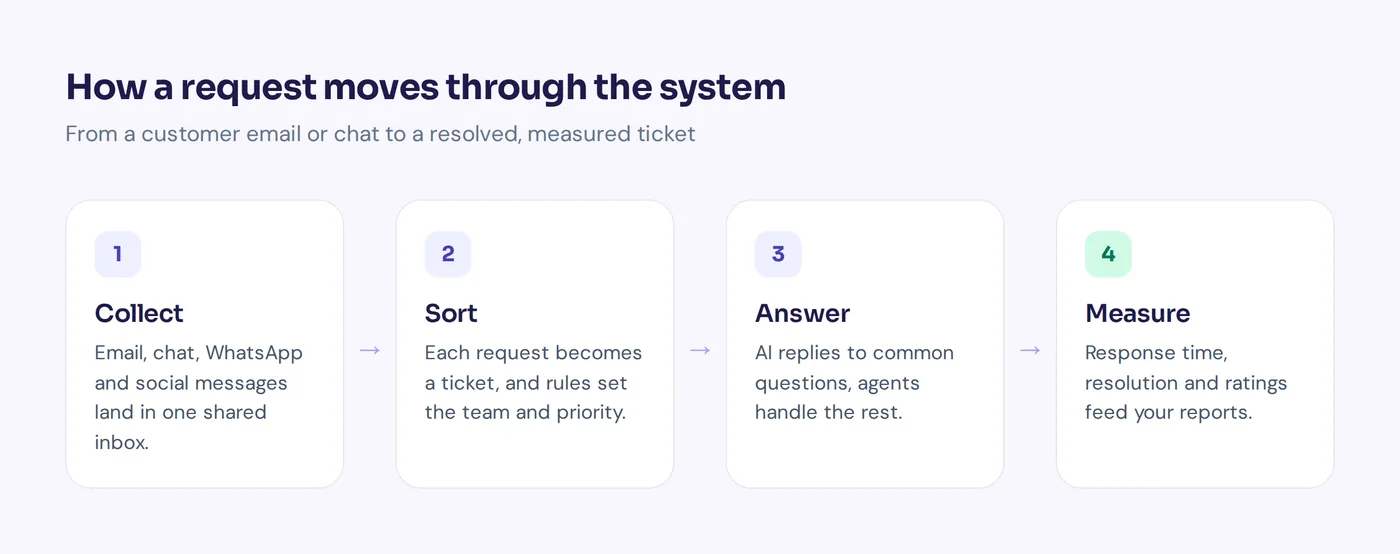
How a customer service email system works
Email is still the backbone of support for many businesses, so it's worth seeing how a customer service email system handles it:
- Connect your support address. You connect [email protected] (Gmail, Outlook, Zoho or any IMAP/SMTP mailbox), or forward it to the system.
- Every message becomes a ticket. It gets a status, a priority and an owner. Replies stay in the same thread.
- Rules sort it. Keywords, sender or topic decide the team and priority.
- AI answers or drafts. Common questions get an answer straight away; harder ones get a draft for an agent to check.
- The customer replies. The ticket reopens automatically, so nothing gets lost.
- It closes and gets measured. Response and resolution times feed into your reports.
The big win over a shared inbox: everyone sees who owns what, and nothing is "read" and forgotten.
Customer service management vs CRM
People often mix these up, and many vendors sell both, so here is the plain difference.
Customer relationship management (CRM) software tracks who your customers are and where they are in the sales process: leads, deals, contact details, purchases and marketing activity. A CRM system is mainly for sales and marketing teams, and it holds the long-term customer data.
A customer service management system handles the conversations after someone needs help: questions, problems, refunds and complaints. It's built for the customer service team, with inboxes, tickets, routing and service metrics.
| CRM software | Customer service management system | |
|---|---|---|
| Main users | Sales and marketing | Support and service team |
| Core object | Contacts, leads, deals | Conversations, tickets, cases |
| Main goal | Build strong customer relationships and revenue | Resolve customer issues quickly |
| Key numbers | Pipeline, revenue, conversion | Response time, resolution time, CSAT |
So what is CRM used for in customer service? Mostly context. When the two are connected, an agent sees the customer's plan, past orders and sales notes next to the conversation. That full view of the customer journey helps them respond to customer problems faster and more personally. Many teams use both and link them, rather than forcing one tool to do everything. Customer service software helps protect customer relationships too, because every customer contact gets a fast, informed answer.
Benefits of customer service management
- Faster replies. Routing, templates and AI cut the time to first response.
- Nothing gets lost. Every request has an owner and a status.
- Consistent answers. A shared knowledge base means everyone gives the same answer.
- Happier team. Less copy-paste work, fair workload, clear priorities.
- Better customer service experience. Customers don't repeat themselves, and they get help on the channel they prefer. A positive customer experience is what builds customer loyalty.
- Real data. You see what customers ask about most, which tells you what to fix in your product, website or policies. Over time you also learn about customer behavior and customer needs you didn't know you had.
- Room to grow. You can add channels and people without rebuilding everything.
Put simply, the right software solution helps you improve customer satisfaction without hiring at the same pace as you grow.
Effective customer service management strategies
A tool alone won't give you exceptional customer service. These habits improve the customer service experience just as much, and they are the core component of effective customer service:
Set clear service targets
Agree on response time goals per channel, for example a first reply within minutes on chat and within one business day by email. Write them down and track them.
Make self-service the first stop
Publish answers to your top questions in a help center and let AI answer from them. Every question a customer solves alone is one your team doesn't have to.
Be proactive
Proactive customer service means reaching out before customers complain: a delay notice, a reminder, a quick "need help choosing a size?" on a product page. It prevents tickets instead of answering them.
Collect customer feedback
Ask for a rating after customer service interactions and read the comments. Low scores tell you where the process breaks, not just which agent had a bad day.
Watch a few service metrics
First response time, resolution time, CSAT, ticket volume by topic and the questions nobody could answer. Five numbers you check every month beat a dashboard nobody opens.
Mistakes to avoid
- Buying for features you'll never use. The biggest platform isn't the best one for a five-person team.
- Over-building on day one. Dozens of tags, statuses and rules confuse agents.
- Letting AI guess. An AI that invents answers is worse than no AI. It should say when it doesn't know and hand over.
- Ignoring the knowledge base. Outdated articles mean outdated answers from agents and AI.
How to choose the right customer service software for your business
Before you book ten demos, answer these questions:
- Where do your customers write? Mailbox only, or also chat, WhatsApp and Instagram? Pick a system that is strong on your main channel.
- How many people answer? Per-seat pricing gets expensive fast. Check what adding five people costs.
- How much is repetitive? If most questions repeat, AI that answers from your knowledge base saves the most time.
- What must it connect to? Your store, billing tool, CRM software or calendar.
- How technical is your team? Some platforms need an admin to configure. Others work in an afternoon.
- What languages do customers use? If you serve several languages, check how well replies and AI handle them.
- What does it cost in a year? Add seats, channel add-ons, AI fees and setup costs.
Then take a free trial of any customer service tool you shortlist and run it on real tickets for a week. You'll learn more in that week than in any demo.
How to implement a customer service system
- Map your channels and request types. List every place customers contact you and the top reasons they do.
- Connect channels one at a time. Start with your inbox or website chat, then add WhatsApp and social.
- Set up statuses, tags and teams. Keep it simple. Five tags you use beat fifty you don't.
- Write templates and help articles for your top 20 questions.
- Add routing rules and automations for the obvious cases, like refunds to billing and angry customers to urgent.
- Turn on AI carefully. Train it on your content, test it, and set clear handoff rules.
- Train the team and agree on targets.
- Review monthly. Look at volume, response times, ratings and the questions nobody could answer.
Best customer service software: examples of customer service systems
Here are well-known options and what each is known for. Check their pricing pages for current plans.
- AnytimeReply. Our product. An AI agent that answers first, plus a helpdesk with tickets, live chat and email in one inbox for website, WhatsApp, Messenger, Instagram, Telegram, email and Slack. Free plan available. It does not handle phone calls.
- Zendesk. One of the best-known help desk platforms, with ticketing, messaging, voice and a large app marketplace. Suits mid-size and large teams.
- Freshdesk. Ticketing and omnichannel support from Freshworks, popular with growing teams.
- Help Scout. A shared inbox and help center known for being simple and friendly.
- Zoho Desk. Help desk software that fits well if you already use Zoho apps.
- HubSpot Service Hub. Customer service tools built into the HubSpot CRM, a good match if sales already lives in HubSpot.
- Salesforce Service Cloud. Enterprise-grade service management for large organizations with complex processes.
- Gorgias. Gorgias is a customer service platform focused on ecommerce stores, especially Shopify.
- Intercom. Messaging-first support with its Fin AI agent, popular with software companies.
Already using one of these? AnytimeReply can sit in front as the AI agent and hand chats over to Zendesk, Freshdesk, Intercom, Zoho Desk, Help Scout or Gorgias.
How AnytimeReply works as a customer service solution
AnytimeReply combines an AI customer service agent with a helpdesk, so small and growing teams get both in one place:
- One inbox for every channel: website chat, WhatsApp, Messenger, Instagram, Telegram, email and Slack. See the helpdesk and live chat.
- Tickets: connect Gmail, Outlook, Zoho or any IMAP/SMTP mailbox. Every support message becomes a ticket with status, priority and owner, and AI answers common ones in the same thread or drafts replies. More on tickets and email.
- AI answers first: trained on your website and documents, in the customer's language, and hands over with a summary when someone asks for a person, gets upset or the AI can't answer.
- Routing and triggers: departments, round robin or least-busy assignment, internal notes and @mentions, and triggers that set priority, tag, assign, notify, post to Slack or call a webhook.
- Help center and analytics: publish articles on your own domain, and see topics, sentiment, CSAT, team performance and the questions the AI couldn't answer.
The Free plan includes website chat, the helpdesk inbox, help center and analytics. Email and messaging channels start on Hobby. See all plans on the pricing page. If you need a phone or call center system, or a full sales CRM, AnytimeReply is not the right fit on its own.
Frequently asked questions
Can you give some examples of customer service systems?
Customer support teams commonly use Zendesk, Freshdesk, Help Scout, Zoho Desk, HubSpot Service Hub, Salesforce Service Cloud, Gorgias, Intercom and AnytimeReply. They range from simple shared inboxes to full enterprise platforms.
What is the difference between a help desk and a customer service management system?
The terms overlap. A help desk usually means ticketing for incoming requests. A customer service management system is broader: tickets plus live chat, messaging, knowledge base, automation, AI and reporting.
What is CRM used for in customer service?
A CRM gives agents context: who the customer is, what they bought and past sales notes. Connected to your service system, it helps agents resolve customer issues faster without asking for details again.
What is the best customer service system for a small business?
One that is strong on your main channel, simple to set up and priced fairly for a small team. AI that answers repeat questions is especially useful when you can't hire more people.
How much does customer service software cost?
It ranges from free plans to expensive enterprise contracts. Common models are per agent, per message or per resolved conversation. Always add up seats, channels and AI fees for a full year.
Do customer service systems use AI?
Most modern ones do, for answering common questions, drafting and translating replies, summarizing threads and spotting trends in conversations.
Final thoughts
A customer service management system isn't about software for its own sake. It's about every customer getting a reply, every request having an owner, and your team spending time on problems that need a person.
If you want to see what AI plus a helpdesk feels like, start free with AnytimeReply, no card needed. Connect your website chat and inbox, and try it on real questions.
Published 29 October 2026 by AnytimeReply team