It's 10 pm. You still have 30 unread customer messages, a proposal to finish and a meeting summary you promised your team this morning. Everyone says AI can take half of this off your plate. But which tool, and for which job?
An AI assistant for business is software that understands plain language and does real work for you or your customers: drafting emails, summarizing meetings, planning your schedule, answering support questions. Some help you inside your own work day. Others talk to your customers directly. Picking the right type matters more than picking the "smartest" model.
Below we explain the main types, compare the best AI assistants for business in 2026 by use case, cover costs and safety, and show how to roll one out without embarrassing yourself in front of customers. We build a customer support assistant, AnytimeReply, so we have a bias. We'll be clear about where other tools fit better.
What is an AI assistant for business?
A business AI assistant uses generative AI models (the technology behind ChatGPT, Claude and Gemini) to read, write and reason in natural language. You type a query or a request, and it produces a draft, an answer or an action.
The difference from a personal chatbot is context. A useful assistant works with your business data: your documents, your inbox, your calendar, your product catalog, your policies. Without that, it gives generic answers that sound good and help nobody.
Most assistants fall into two groups:
- Internal assistants help you and your team work faster: writing, research, summaries, spreadsheets, scheduling and automation.
- Customer-facing assistants talk to your customers on your website, WhatsApp or email. They answer questions, take simple actions and hand tricky cases to a person.
AI agent vs AI assistant vs chatbot: the real difference
These words get mixed up a lot, and vendors don't help. Here is a plain version:
| Chatbot | AI assistant | AI agent | |
|---|---|---|---|
| What it does | Answers in a chat window | Helps a person do a task when asked | Works toward a goal and takes steps on its own |
| Who starts it | The user, every time | The user, every time | A trigger, a schedule or a customer message |
| Example | A button menu on a website | "Summarize this contract" | Checks an order, books a call, updates the CRM |
| Risk | Low | Low, you review the output | Higher, needs limits and approvals |
In practice the lines blur. Modern customer support tools are AI agents that also chat. Many general assistants now take actions too. What matters is how much it does without you checking, and what controls you have.
Best AI assistants for business in 2026 at a glance
We grouped these AI tools by use case, because "best" depends on the job. We haven't run lab tests on every tool. This is a practical map of what each one is known for and who it suits. Prices and plans change often, so check each vendor's pricing page. Most have a free plan or a free trial.
| Use case | Tools to look at | Who it helps |
|---|---|---|
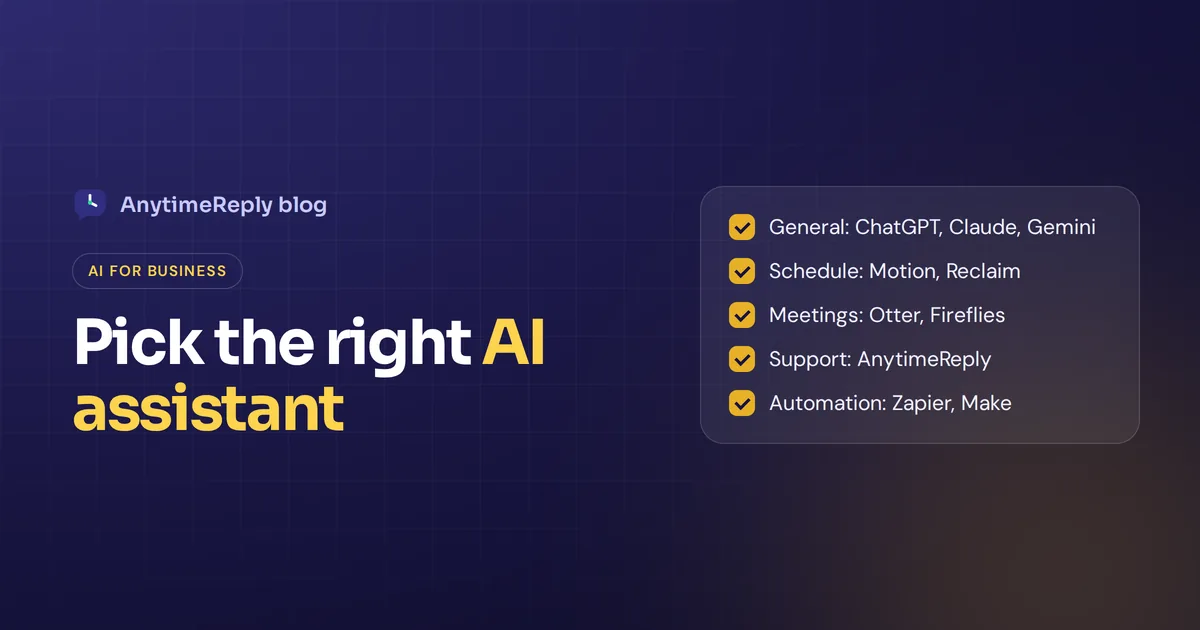
| General writing, research and analysis | ChatGPT, Claude, Gemini | Owners and every team |
| AI inside your office suite | Microsoft 365 Copilot, Gemini in Google Workspace, Notion AI | Teams that live in one workspace |
| Calendar and schedule planning | Motion, Reclaim, Clockwise | Busy owners and managers |
| Meeting notes | Otter.ai, Fireflies.ai | Sales, agencies, anyone with lots of calls |
| Customer support | AnytimeReply, Intercom Fin, Tidio Lyro AI, Freshdesk Freddy AI | Shops, service businesses, SaaS |
| Business automation | Zapier, Make, Lindy | Operations and admin-heavy teams |
General AI assistants and AI in Google Workspace or Microsoft 365
ChatGPT
The assistant most people try first. Good at drafting, brainstorming, data analysis from uploaded files and general questions. Higher limits and advanced AI features sit on paid plans. OpenAI offers business plans with admin controls for teams, plus a larger enterprise plan. The ChatGPT Business tier is the usual starting point for a small team.
Good for: a smart all-rounder for AI writing, research and thinking work.
Claude
Claude by Anthropic is known for careful, natural writing, reading long documents and coding help. Teams use it to review contracts, write reports and work through big files in one go.
Good for: long documents, nuanced writing and analysis.
Gemini
Google's assistant. On its own it's a general assistant with strong search. Inside Google Workspace it can work across Gmail, Docs, Sheets and Drive.
Good for: teams already using Gmail and Google Docs.
A quick opinion: the gap between these three changes every few months. Pick the one that fits the tools you already use, then learn to use it well. That beats switching every time a new model ships.
AI built into Google Workspace, Microsoft 365 and Notion
The easiest AI to adopt is the one inside software you already pay for. No new login, no copy and paste. Many AI assistants now live inside these suites:
- Microsoft 365 Copilot adds an AI layer built into Word, Excel, Outlook and Teams. It can draft emails from a thread, summarize meetings in Teams and help with Excel formulas.
- Gemini does similar work in Gmail, Docs and Sheets.
- Notion AI writes, summarizes and answers questions from your Notion pages, which makes it a handy internal knowledge assistant.
The trade-off: these are tied to one workspace. If your team works across multiple platforms, a general assistant or an automation tool may fit better.
Best AI personal assistants for schedule and meetings
Calendar and schedule assistants
A personal AI assistant for your calendar is less flashy than AI chatbots, but many owners say it's the one they'd keep. Tools like Motion, Reclaim and Clockwise plan your schedule around meetings, deadlines and focus time, then move things when plans change.
- Motion combines your task list with your calendar and builds a daily schedule for you.
- Reclaim protects time for habits and focus work, and works with Google Calendar and Outlook.
- Clockwise is popular with teams that want to find shared meeting times and fewer fragmented days.
Good for: small business owners whose real problem is not writing, but a schedule that's always on fire.
Meeting assistants
Otter.ai and Fireflies.ai join your calls, transcribe them, and send a summary with action items. Small thing, big time saver. You stop taking notes and start listening.
Keep in mind: tell people when a call is being recorded, and check your local rules on recording consent.
Customer support AI assistants
This is where AI often pays for itself fastest, because the same questions arrive every day. A support assistant learns from your website, help articles and policies, then replies to customers on chat, messaging apps and email. Good ones know when to stop and pass the conversation to a person.
- AnytimeReply is an AI agent plus a built-in helpdesk, made for small and growing businesses whose customers write on the website, WhatsApp, Instagram and Messenger, often in more than one language. More on it below.
- Intercom Fin is a well-known AI agent for support teams already using Intercom or larger help desks.
- Tidio Lyro AI is popular with ecommerce stores that want live chat with AI answers.
- Freshdesk Freddy AI adds AI support features to the Freshdesk helpdesk: the AI suggests replies, sorts tickets and answers common questions.
The right pick is usually the one that matches where your customers already write to you. Conversational AI on your website is a good start, but if most of your sales happen in WhatsApp or Instagram DMs, the assistant must work there too.
Workflow automation and AI agents
Some work is not writing or chatting. It's moving data: a new lead arrives, so add it to the CRM, send a welcome email and tell sales in Slack. That's workflow automation, and it is where AI workflows quietly save hours.
- Zapier and Make connect thousands of apps and let you add AI steps, so a workflow can summarize, sort or draft along the way.
- Lindy pitches itself as an AI teammate: you build AI agents that handle email, meeting scheduling and follow-ups.
Automation saves the most time on boring, repeatable tasks in daily operations. Start with one workflow you do at least weekly, and watch it closely for the first month.
How small businesses can use AI assistants
Forget the hype for a minute. Here is real, everyday work AI handles well for small businesses today:
- Answer repeat customer questions. Shipping times, return rules, opening hours, prices. At 2 am, in the customer's language.
- Draft emails and replies. You give the key points, it writes a clean first draft you edit.
- Summarize long things. A 40-page contract, a 1-hour meeting, a week of customer chats.
- Turn notes into documents. Rough bullets into a proposal, a job post or an SOP.
- Plan your schedule. Fit tasks around meetings and protect focus time.
- Analyze simple data. Upload a sales export and ask which products sold best last month.
- Take small actions. Check an order, book a call, update a contact, when connected to your core business tools.
And here is what AI is still bad at: facts it was never given (it may guess), judgment calls like big refunds or legal questions, brand-new situations, and accountability. The AI can draft the contract. You still sign it.
Real examples: how an AI business assistant helps day to day
Tools are easier to judge when you picture a normal week. Here are a few realistic examples:
- An online clothing shop. Most messages ask "where is my order?" and "do you ship to Canada?". A support assistant answers those on the website and Instagram, checks orders for verified customers, and passes the rare damaged-parcel complaint to the owner with a summary.
- A small accounting firm. A general assistant drafts client emails and summarizes new tax rules. A meeting assistant writes up client calls. The partners review everything before it goes out.
- A SaaS startup. The support assistant answers setup questions from the docs, and the team uses AI in its wiki to keep internal docs up to date. Bugs and billing disputes go to a person.
- A consultant who sells on calls. A scheduling assistant protects focus time, the meeting assistant handles notes, and Zapier pushes new leads into the CRM. Small business sales follow-ups stop slipping.
Notice the pattern. Every AI assistant here does one clear job, and a person stays in charge of decisions. That's how AI helps you grow your business without creating new problems across your business.
How to choose the right AI assistant
- Start with the pain, not the tool. Write down where your time goes each week. Customer messages? Writing? Meetings? Your schedule? Pick the type that hits the biggest pain.
- Check what data it can use. Can it read your website, documents, inbox or store? Can it connect to your existing tools and CRM?
- Look at control and safety. Can you limit what it says and does? Does it hand over to a person? Is your data used to train models?
- Check where it works. For customer-facing tools: website, WhatsApp, Instagram, email. For internal ones: the apps your team already uses.
- Understand the real cost. Per user, per message or per credit? Model it at your real volume.
- Test with real work. Give it last week's actual questions or tasks. Judge the output, not the sales page.
Choosing the best AI setup is not about the fanciest model. For a small team, our honest advice: one general assistant for everyone, plus one specialist tool for your biggest use case. A single AI assistant rarely does everything well.
What does an AI assistant cost?
Costs range from free to serious money, depending on the type:
- General assistants usually have a free plan with limits, then a monthly price per user. Enterprise plans are quoted on request.
- Built-in suite AI is often an add-on per user on top of your existing subscription.
- Customer support assistants often charge per AI reply, per resolution or with monthly credits, sometimes plus seats.
- Automation tools usually charge by the number of tasks or runs.
For example, AnytimeReply has a free forever plan (50 credits a month), then Hobby at $9, Standard at $29 and Pro at $79 a month, with team members included. See pricing for current details, prices can change. For other tools, check their pricing pages, as plans change often.
How AnytimeReply works as your customer-facing assistant
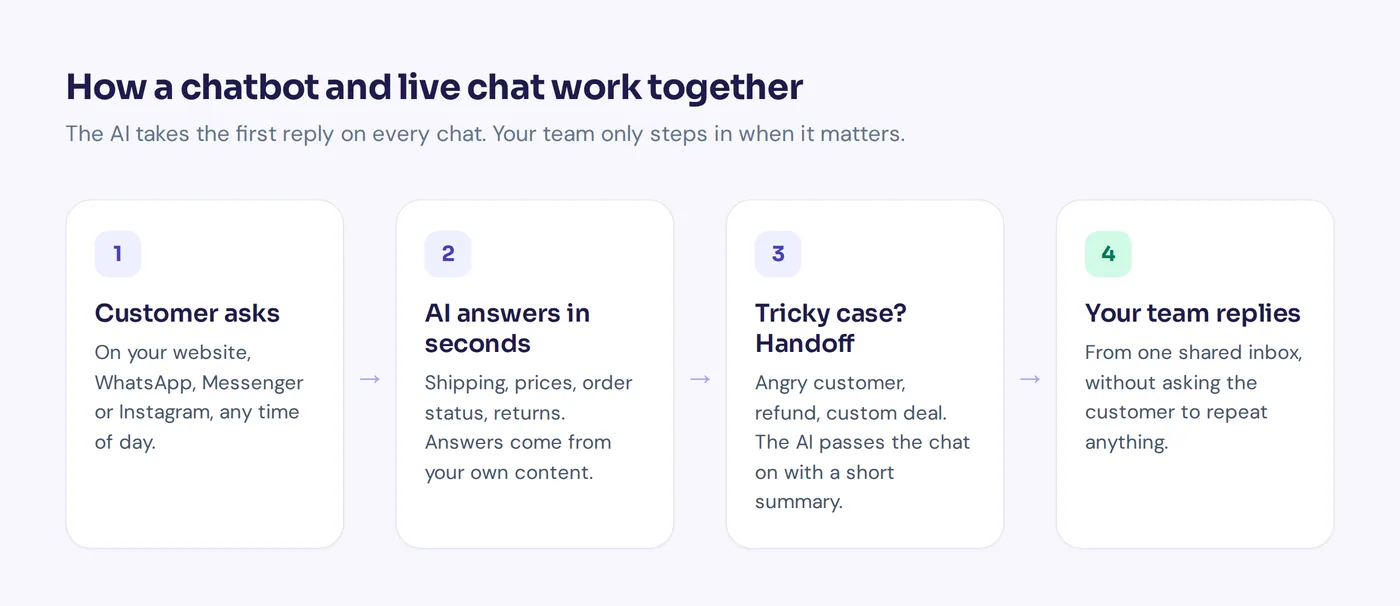
AnytimeReply is the customer side of that pair. You add your website, documents and Notion pages, and it trains an AI agent that answers customers in seconds, in their language, on your website and (on paid plans) WhatsApp, Messenger, Instagram, Telegram and email.
- When it doesn't know, it says so instead of guessing. Every answer has a confidence score.
- It hands the chat to your team with a summary when a customer asks for a person, gets upset or asks something it can't answer. Your team replies from one shared inbox.
- For verified customers it can take actions like checking an order in Shopify or WooCommerce, or booking with Cal.com or Calendly (paid plans).
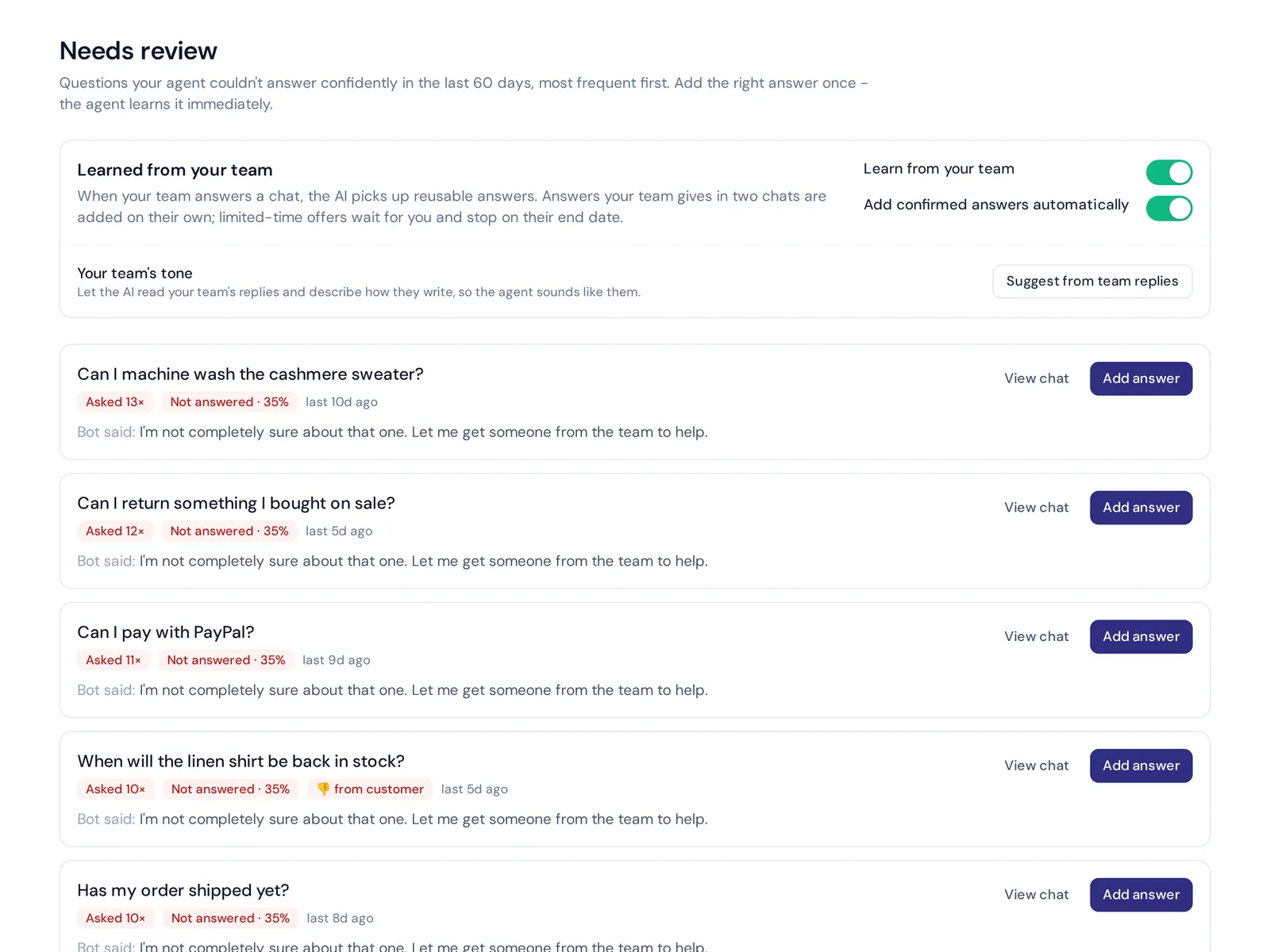
- Analytics show what customers ask and which questions it couldn't answer, so you can fill the gaps.
Where it is not the right fit: it is not a general writing assistant or an AI personal assistant for your calendar, and it doesn't answer phone calls or SMS. Use a general assistant for your own work and AnytimeReply for your customers.

How to roll out an AI assistant safely
- Feed it good sources. Your FAQ, shipping and return pages, pricing, policies. Fix outdated pages first.
- Write exact answers for sensitive topics. Refunds, guarantees, anything legal.
- Test before launch. Ask 30 real questions from last month. Try to trick it.
- Set handoff rules. Decide when a person takes over and who that person is.
- Start small. One channel, one team, two weeks. Then expand.
- Review every week. Read real conversations and fix what went wrong.
Frequently asked questions
Which AI assistant is best for a small business?
It depends on the job. For writing and research, a general assistant like ChatGPT, Claude or Gemini. For customer questions, a support assistant trained on your business, like AnytimeReply. For a chaotic calendar, a scheduling tool like Motion or Reclaim. Many small businesses use two.
Are there free AI tools for business?
Most major assistants have a free plan with limits. AnytimeReply has a free forever plan with website chat, a helpdesk inbox and 50 AI credits a month, no card needed.
Is it safe to use an AI assistant with business data?
Read each vendor's privacy terms. Look for clear answers on whether your data trains their models, where it is stored and how to delete it. AnytimeReply does not use customer data to train AI models.
Can AI agents replace employees at a small business?
Usually not. They take the repetitive work so your people can focus on sales, tricky cases and customers who need a human. Small teams often find they can grow without hiring as fast.
Can an AI assistant connect to my existing tools and data?
Many can. General assistants connect to cloud drives and email on business plans. Support assistants like AnytimeReply learn from your website, files and Notion, and on paid plans connect to Shopify, WooCommerce, Stripe, HubSpot, Calendly and more. Automation platforms like Zapier link almost everything else.
How do AI assistants handle outdated information?
They repeat whatever they were given, so old pages mean old answers. Keep your sources current and retrain after changes. AnytimeReply can retrain daily on the Standard plan and up, and the answers you write in Q&A always win over other sources.
What is the 10/20/70 rule for AI?
It's a rule of thumb from Boston Consulting Group: roughly 10% of the effort in an AI project goes into algorithms, 20% into technology and data, and 70% into people and processes. In plain words, the tool is the easy part. Training your team and changing how work gets done is the real job.
Start with one job
Don't try to automate your whole business at once. Pick the one task that eats the most time, find the assistant built for it and test it with real work.
If that task is answering customers, start free with AnytimeReply, no card needed.
Published 31 October 2026 by AnytimeReply team