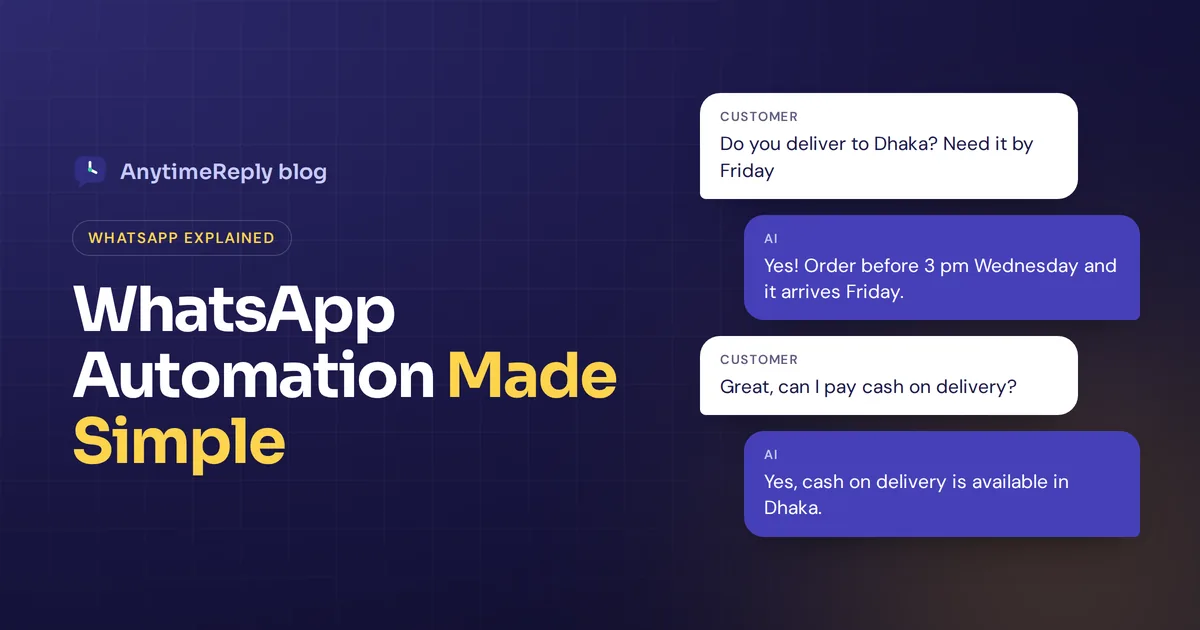
Your WhatsApp is buzzing. "Price?" "Do you deliver to Dhaka?" "Is this still available?" "Where is my order?" Same questions, all day, and half of them arrive after you've gone to bed. By morning, some of those customers have already bought somewhere else.
WhatsApp automation means letting software handle the repetitive parts of WhatsApp for you: instant replies, answers to common questions, order updates, reminders and marketing messages, with a person stepping in when it matters. Done right, customers get answers in seconds and you stop living inside your phone.
Want WhatsApp to work like a team member that never sleeps? Think of this as a plain-English guide to WhatsApp automation: what you can automate, the difference between the WhatsApp Business app and the API, how marketing automation works without getting your number banned, examples you can copy, and how to set it up step by step.
What is WhatsApp automation?
WhatsApp automation refers to using tools to send, answer and organize every WhatsApp customer message without typing each one by hand. It ranges from very simple to very smart:
- Auto replies: a greeting message for new chats and an away message outside business hours.
- Quick replies: saved answers you send with a shortcut. A simple way to automate messages you type every day.
- Rule-based WhatsApp chatbots: menus with buttons ("1 for orders, 2 for returns").
- AI agents: bots that understand free-text questions and reply from your own website and documents, in the customer's language.
- Notifications and broadcasts: order confirmations, shipping updates, reminders and promotions sent to customers who opted in.
- Workflows: automatic tagging, routing to the right team member, and syncing with your store, CRM or calendar.
Why businesses use WhatsApp automation
Chatting with businesses inside WhatsApp is normal now. WhatsApp has become the main messaging app in large parts of South Asia, Latin America, Africa, the Middle East and Europe. For many small shops and Facebook sellers, it is the main sales channel. So it makes sense that businesses use WhatsApp for support and sales.
The catch: WhatsApp feels personal, so customers expect fast replies. Automation tools help businesses:
- Reply instantly, 24/7. No more lost sales because someone asked the price at midnight.
- Stop repeating yourself. Price, delivery, sizes and payment methods get answered automatically.
- Handle more WhatsApp conversations with the same team. Busy days stop being a crisis.
- Keep customers updated. Order and delivery messages cut down "where is my order?" questions.
- Improve customer engagement and sales. Abandoned cart reminders, restock alerts and follow-ups bring people back.
- Deliver a better customer experience. Fast, consistent answers on the app customers already use every day.
The goal is a balance between automation and the human touch. Automation ensures nobody waits for simple answers, and automation makes your team's day calmer. People handle the rest. That's how good tools enable businesses to turn WhatsApp into a real support and sales channel.
WhatsApp Business app vs WhatsApp Business API
This is the first decision, and it decides which automation features you get.
| WhatsApp Business app | WhatsApp Business Platform (API) | |
|---|---|---|
| Best for | Solo sellers and very small teams | Growing businesses and support teams |
| Setup | Download the app | Through Meta or a WhatsApp Business Solution Provider |
| Automation | Greeting message, away message, quick replies, labels | Chatbots, AI agents, workflows, integrations, broadcasts at scale |
| Team use | A few linked devices | Many agents in a shared inbox through a platform |
| Cost | Free | Meta charges for some template messages, plus your platform's fee |
The free WhatsApp app for business has basic automation features and is a fine start. But once you have more than a few dozen chats a day or more than one person answering, the official WhatsApp Business API (through a platform) is where real automation lives.
How does WhatsApp automation work? Messages on WhatsApp, step by step
Here is how the automation works behind the scenes when you use the API. Using WhatsApp API features, a platform can automate WhatsApp messages from start to finish:
- You get WhatsApp Business API access. You connect your WhatsApp number to Meta's platform, usually through a business solution provider (BSP) or a tool that handles it for you. Meta verifies your business.
- A trigger fires. A customer sends a WhatsApp message, places an order, abandons a cart or books an appointment.
- The automation platform decides what to do. A chatbot flow, an AI agent or a rule picks the reply, based on the message and your data.
- The reply goes out via WhatsApp. Inside the 24-hour customer service window, you can reply freely. Outside it, you must use WhatsApp templates approved by WhatsApp.
- A person takes over when needed. The chat moves to your team inbox with the history attached.
That's automation through the WhatsApp Business API in a nutshell. So when a customer sends a WhatsApp message at 2 am asking about delivery, the system reads it, answers from your shipping policy and logs the chat. Nobody had to wake up.
What you can automate on WhatsApp: use cases for every business need
Customer support
Answer FAQs about delivery, returns, payment and opening hours. An AI agent can also read order status for verified customers and hand the chat to a person when the question is tricky.
Sales and product questions
"Is this available in large?" "How much is the blue one?" Automation can share prices, stock and product links straight from your catalog.
Order and delivery updates
Order confirmed, shipped, out for delivery, delivered. These are WhatsApp automated messages triggered by your store, sent as approved templates.
Bookings and reminders
Salons, clinics, tutors and consultants can let customers book directly on WhatsApp and send reminders before the appointment.
Lead capture and qualification
Ask a few questions (budget, location, what they need), save the answers and pass hot leads to your sales team.
Feedback and reviews
Ask for a rating a few days after delivery. Happy customers get a review link; unhappy ones go to a person.
Whether it's customer support or marketing, pick the use case that matches your business needs first. Trying to automate everything at once is how automation efforts stall.
WhatsApp marketing automation: running marketing campaigns safely
WhatsApp marketing automation means sending promotional and follow-up messages automatically: abandoned cart reminders, restock alerts, new collection announcements, birthday offers and win-back messages.
WhatsApp campaigns can work very well, because people actually read their chats. They can also go badly wrong. WhatsApp is strict about spam, and customers who feel spammed will block or report you. That hurts your number's quality rating and can limit or ban it.
The rules for marketing campaigns:
- Get opt-in first. Only message people who agreed to hear from you on WhatsApp.
- Use approved templates. Outside the 24-hour window after a customer's last message, businesses can only start conversations with templates Meta has approved.
- Make it easy to stop. Include a clear way to opt out, like replying STOP, and respect it.
- Send at a safe pace. Blasting thousands of messages from a new number is asking for trouble. Ramp up slowly.
- Segment. Send WhatsApp messages based on behavior, like restock alerts only to people who asked about that product.
- Don't overdo it. One useful message a week beats three sales blasts a day.
On costs: since July 2025 Meta charges per template message, with rates that depend on the category (marketing, utility, authentication) and country. Replies inside the customer service window are generally free. Rates change, so check Meta's WhatsApp pricing page for your country.
WhatsApp automated messages you can copy
Simple examples to adapt. Replace the details in brackets.
Greeting message
Hi! Thanks for messaging [Store name]. Ask me anything about sizes, delivery or your order and I'll reply right away. Want a person? Just type "agent".
Away message
Thanks for your message! Our team is offline until 9 am, but our assistant can still help with prices, delivery and order status. For anything else, we'll reply first thing tomorrow.
Order confirmation
Hi [Name], your order #[number] is confirmed. Total: [amount]. We'll message you here when it ships. Questions? Just reply to this chat.
Shipping update
Good news, [Name]! Your order #[number] is on its way. Track it here: [link]. Expected delivery: [date].
Abandoned cart reminder
Hi [Name], you left [product] in your cart. It's still available in your size. Want me to hold it? Reply YES and I'll send the checkout link. Reply STOP to stop these messages.
Restock alert
[Product] is back in stock! You asked us to let you know. Sizes go fast: [link]. Reply STOP to opt out.
Appointment reminder
Hi [Name], a reminder of your appointment at [business] tomorrow at [time]. Reply 1 to confirm or 2 to reschedule.
Feedback request
Hi [Name], did your order arrive OK? Rate us from 1 to 5. If anything went wrong, reply here and a person from our team will help.
How to choose WhatsApp automation tools for your business needs
There are many options, from chatbot builders to full helpdesks. A good WhatsApp automation platform built for your size makes WhatsApp automation easy instead of another job. The best WhatsApp automation tool for you depends on what you need. Look for features like:
- Official API connection, so growing teams can connect to the WhatsApp Business API properly and scale their WhatsApp use.
- A shared team inbox for managing WhatsApp with more than one person.
- AI or a WhatsApp chatbot builder that fits your skills, with advanced automation when you need it. No-code is enough for most small businesses.
- Broadcasts with opt-out and sending limits built in.
- WhatsApp integration that lets you integrate WhatsApp with your store, CRM or calendar, so automations can use real order and customer data.
- Human handover with full chat history.
- Analytics to see what customers ask and where the bot fails.
- Clear pricing, including Meta's message fees.
If you also sell on Instagram, Messenger or your website, a platform with automation across every channel saves you juggling apps.
How to set up WhatsApp business automation step by step
- Pick your goal. Faster support? More sales? Fewer "where is my order" questions? Start with one.
- Choose app or API. Solo and low volume: the free app's built-in tools. Team, AI or broadcasts: the API through a platform.
- Pick a platform using the checklist above.
- Connect your WhatsApp number. Follow the platform's steps to set up WhatsApp on the API and get WhatsApp verified for business messaging.
- Train or build the bot. Add your FAQs, website, product info and policies. For rule-based bots, design the menu.
- Set handover rules. Decide when a person takes over: the customer asks, gets upset, or the bot isn't sure.
- Create templates. Write and submit order updates and marketing templates for approval.
- Test it. Send real questions, with typos and voice notes, and check every reply.
- Launch and review weekly. Read unanswered questions and fix gaps. Your automation journey doesn't end at launch: keep improving to optimize your WhatsApp results.
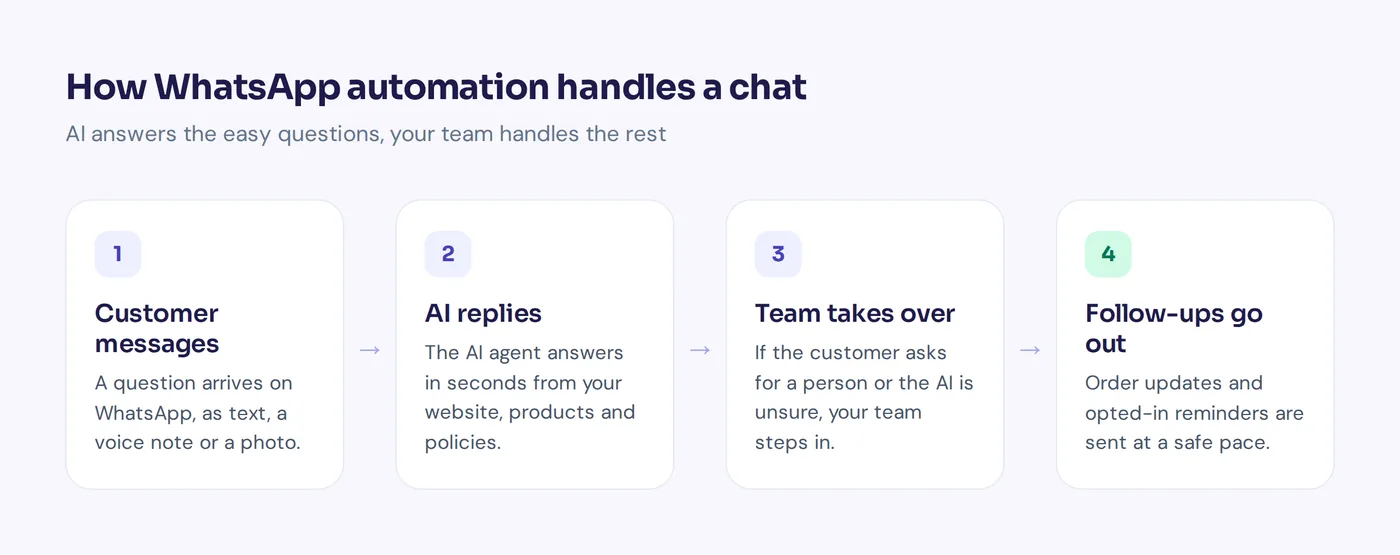
Rule-based bots vs AI-powered WhatsApp automation
Menu bots are predictable and cheap, but customers hate typing "3" to get anywhere, and they break when someone asks something off the menu. AI-powered WhatsApp automation understands normal messages like "do u have this in red, need it by friday" and answers from your own content.
One policy point: from January 2026, Meta's WhatsApp Business terms bar general-purpose AI chatbots (the "ask me anything" assistant kind) from the API, as TechCrunch reported. AI used for your own business's support and sales, answering about your products and orders, is still the use case WhatsApp is built for. Keep your bot focused on your business.
Common WhatsApp automation mistakes
- No way to reach a human. The fastest way to make customers angry.
- Messaging without opt-in. Leads to blocks, reports and a restricted number.
- Too many broadcasts. People mute or block brands that message too often.
- Robotic replies. Write like a person. Short, friendly, clear.
- Ignoring voice notes and photos. Many customers send voice notes or screenshots. Make sure your tool can handle them.
- Set and forget. Prices, stock and policies change. Your bot's knowledge must too.
How AnytimeReply helps you automate WhatsApp for your business
AnytimeReply gives you an AI agent on WhatsApp with a shared inbox for your team. It's a simple way to start automating WhatsApp business chats without code.
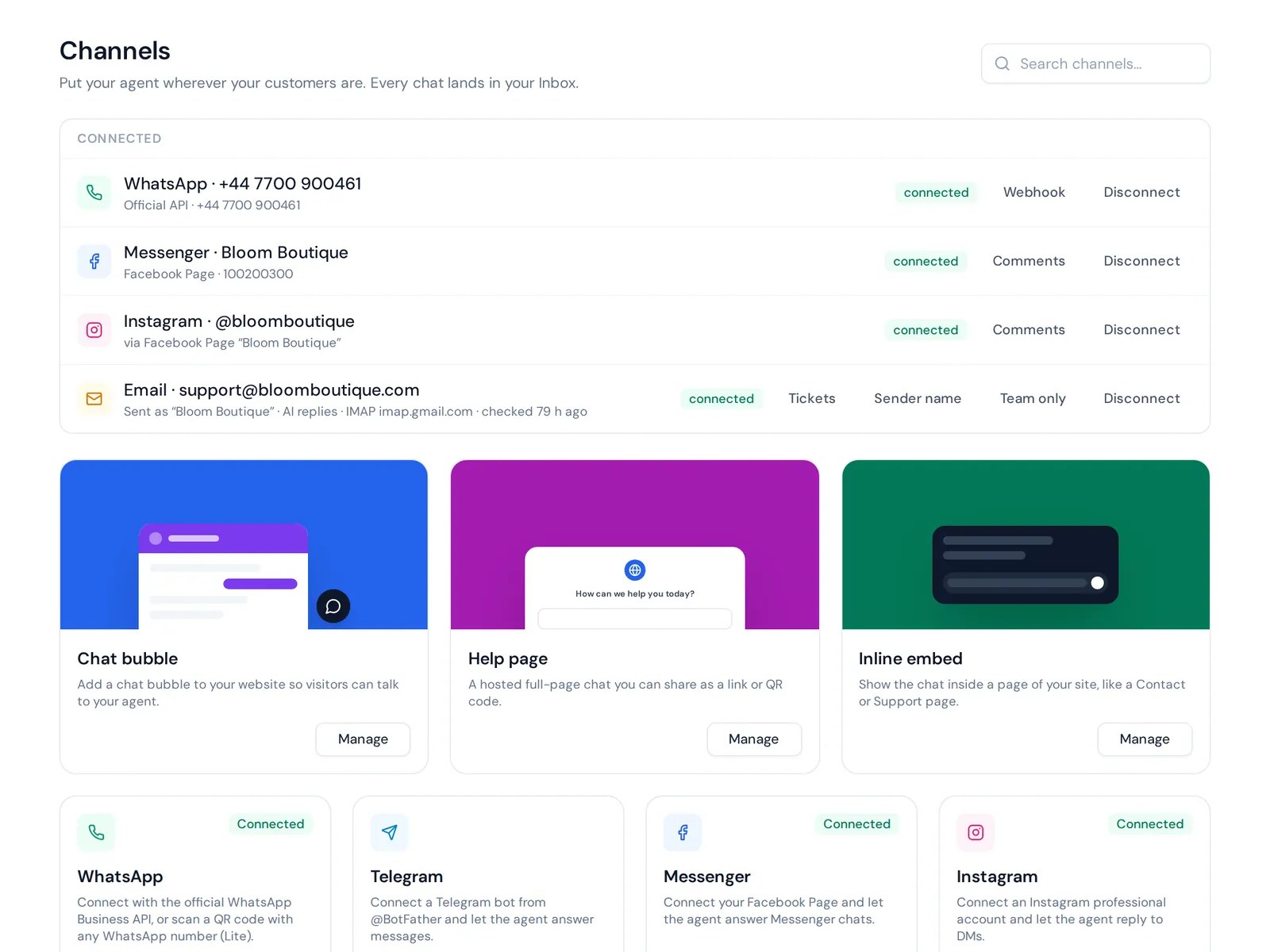
- Two ways to connect: the official WhatsApp Business API, or a quick QR connect.
- AI that answers from your business: trained on your website, documents and products, it replies in seconds in the customer's language, including Bangla, Banglish, Hindi and Hinglish.
- Understands voice notes and photos, so a customer can send a voice message or a screenshot of a product.
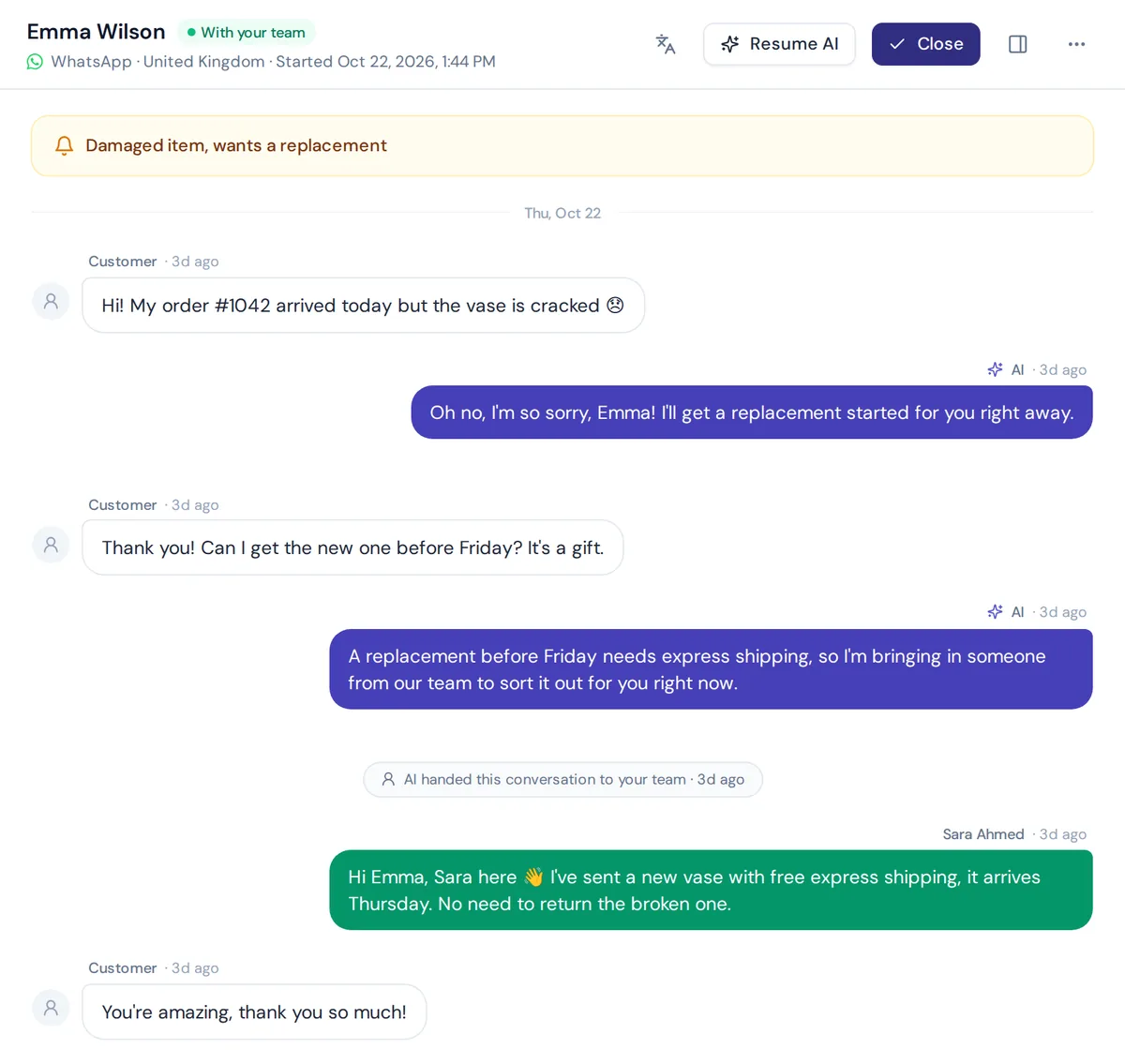
- Human handover: when a customer asks for a person, gets upset or the AI isn't sure, the chat goes to your team with a summary. The AI pauses while a person is in.
- Safe broadcasts: WhatsApp broadcasts go out at a safe pace with daily limits and STOP opt-out, plus one follow-up to quiet customers.
- Actions: check orders in Shopify or WooCommerce, or book meetings with Cal.com or Calendly, for verified customers.
- One inbox: WhatsApp sits next to website chat, Messenger, Instagram and email in the helpdesk.
WhatsApp and broadcasts are on paid plans, starting with Hobby at $9 a month (see pricing; prices can change). Honest limit: there is no SMS or phone channel in our product, it's chat, messaging and email only.
Frequently asked questions
Can I do automated messages on WhatsApp?
Yes. The Business app has free greeting, away and quick replies. For chatbots, AI replies, workflows and broadcasts, you need the WhatsApp API through a tool.
How can I use AI on WhatsApp for my business?
The easiest way to use automation with AI: connect your number to a platform with an AI agent, train it on your website and FAQs, and set rules for when a person takes over. Using WhatsApp chatbots with AI lets customers type normally instead of picking from menus.
How can I send 1,000 WhatsApp messages at once?
Use a broadcast feature on the WhatsApp Business API with an approved template, sent only to people who opted in. New numbers have daily sending limits that grow as your quality rating stays good, so ramp up gradually.
Are WhatsApp bots illegal?
No. Bots that use the official API, follow Meta's policies, message only opted-in users and stick to your business are allowed. Mass-messaging tools that spam people or work around Meta's rules can get your number banned.
Is WhatsApp automation free?
The app's simple auto replies are free. With the API, Meta charges for some template messages and the platform usually has its own fee.
Do I need coding skills?
No. Most platforms let you automate your WhatsApp without code: connect your number, add your FAQs and set rules. Developers can go further with APIs and webhooks.
Let WhatsApp work while you sleep
WhatsApp automation isn't about replacing the personal touch customers love. It's about answering the easy questions instantly so you have time for the conversations that matter.
Want to try it? Start free with AnytimeReply, no card needed, train your agent on your website, and connect WhatsApp when you're ready.
Published 4 November 2026 by AnytimeReply team