A customer sends a voice note on WhatsApp at midnight: "Hi, my order hasn't arrived, can you check?" Not long ago, most businesses answered that with a menu bot ("Press 1 for orders"), or not at all until morning. Today an AI agent can listen to the voice note, look up the order, reply with the tracking status, and pass the chat to a person if the parcel is truly lost.
That shift, from scripted bots to agents that understand and act, is the biggest of the current trends in AI agents for WhatsApp. But it's not the only one. WhatsApp's owner Meta has changed the platform rules and pricing, and even launched its own agent. All of that affects what you should build this year.
This is a complete guide for business owners: the trends that matter, what they mean in practice, how to set up an agent, and how to pick the best WhatsApp AI agents for your team. We build one of these tools, AnytimeReply, so we have a view. We'll keep it honest.
What is a WhatsApp AI agent vs a chatbot?
A WhatsApp AI agent is software connected to your WhatsApp number that reads customer messages, understands them with a large language model, and replies on its own. A good one also does things: checks an order, handles a booking, captures a lead, or hands the conversation to your team.
The classic WhatsApp chatbot is different. It follows a fixed script of buttons, keywords and quick replies. An AI agent works from your business information (website, policies, product catalog) and handles natural language, typos and all.
| Classic WhatsApp chatbots | WhatsApp AI agent | |
|---|---|---|
| How it understands | Keywords and button clicks | Natural language, voice notes and photos |
| What it answers | Only what the script covers | Anything in its knowledge, and says so when it doesn't know |
| Takes actions | Rarely, through rigid flows | Order lookups, appointment booking, refunds within limits |
| Languages | One script per language | Replies in the customer's language |
| Handoff | "Type AGENT" | Detects frustration and hands over with a summary |
Chatbots still have a place for simple menus. But for open questions, AI agents on WhatsApp have clearly taken over. One warning: many tools now label any bot “AI agents”, so test before you trust the label.
1. From answers to actions: agents that automate real tasks
The first wave of AI on WhatsApp was all about answers: shipping times, return policy, business hours. Useful, but customers often want something done.
So the clear direction is agentic AI. Through an integration with your business tools (Shopify, a CRM, Google Calendar, payment systems), the agent completes tasks inside the chat. "Where is my order?" gets a real tracking update. "Can I book for Saturday?" ends with a confirmed slot. A WhatsApp AI agent automates the whole workflow, not just the first reply. That kind of automation is what separates an agent from a simple menu bot.
The catch is trust. An autonomous agent that can cancel orders or issue refunds needs rules: verify the customer first, ask for confirmation, set amount limits, and require team approval for risky steps. The AI systems and AI tools worth using build those guardrails into the setup, so actions happen safely inside WhatsApp.
2. WhatsApp Business API rules in 2026 favor business-focused AI
This is the policy change every business should know. Meta updated the WhatsApp Business Platform terms so that general-purpose AI assistants, the "ask me anything" bots where the AI itself is the product, are no longer allowed on the WhatsApp Business API. It applied to new users from October 2025 and to everyone from January 15, 2026.
What's still allowed is the kind of AI most businesses actually want: agents that support your business, like customer support, order tracking, bookings and lead qualification. If you planned a personal AI style bot that answers anything about everything, rethink it. If your agent sticks to your products and services and offers a path to a human, you're on the right side of the line.
Our honest take: this is good for customers. It pushes everyone toward focused agents trained on real business content, which is what gives better answers anyway.
3. Per-message pricing rewards agents that resolve fast
Pricing shapes how agents are designed. According to the official WhatsApp pricing page, Meta moved from conversation-based pricing to per-message pricing on July 1, 2025. From October 1, 2026, each business number gets a free monthly allowance of service messages, and messages beyond that tier are charged.
So every extra WhatsApp message now has a cost, whether the AI or a person sends it via WhatsApp. That makes efficiency a feature. The best agents answer the real question in one clear reply instead of three and avoid pointless "anything else?" loops. Watch your AI usage too: most platforms bill in AI credits, so you pay twice for a chatty agent. Rates vary by country and message type, so check the page for your market.
4. Built-in AI from Meta for WhatsApp and Instagram
Meta Business Agent, the company's own AI for customer conversations, launched globally this year after a long test in markets like India and Mexico. It answers questions, recommends products, books appointments, helps qualify leads and passes chats to a person.
For a small shop that wants to run WhatsApp sales from the WhatsApp Business app alone, that may be enough. For businesses that also need website chat, email, WhatsApp and Instagram in one inbox, custom actions with their own systems, or more control over models and knowledge, a dedicated platform still makes sense. Expect both to co-exist: the built-in option for simple needs, third-party agents for deeper setups where WhatsApp is one channel among several.
5. Voice notes, photos and every language
WhatsApp users love voice notes, and in many countries customers would rather speak than type. They also send photos: a cracked product, a payment screenshot, a dress they want in another size. Advanced AI now understands voice notes and images, not just text, which makes automated conversations usable for many more people who use WhatsApp as their main messaging app.
Language is the other big shift. Customers write in Hinglish ("order kab aayega?"), Banglish, or a mix of Spanish and English. Old bots broke on this. Current agents reply in the customer's own language without a separate bot for each. For businesses selling across borders, this is often the biggest win of all.
6. The AI agent in WhatsApp answers first, people handle the hard stuff
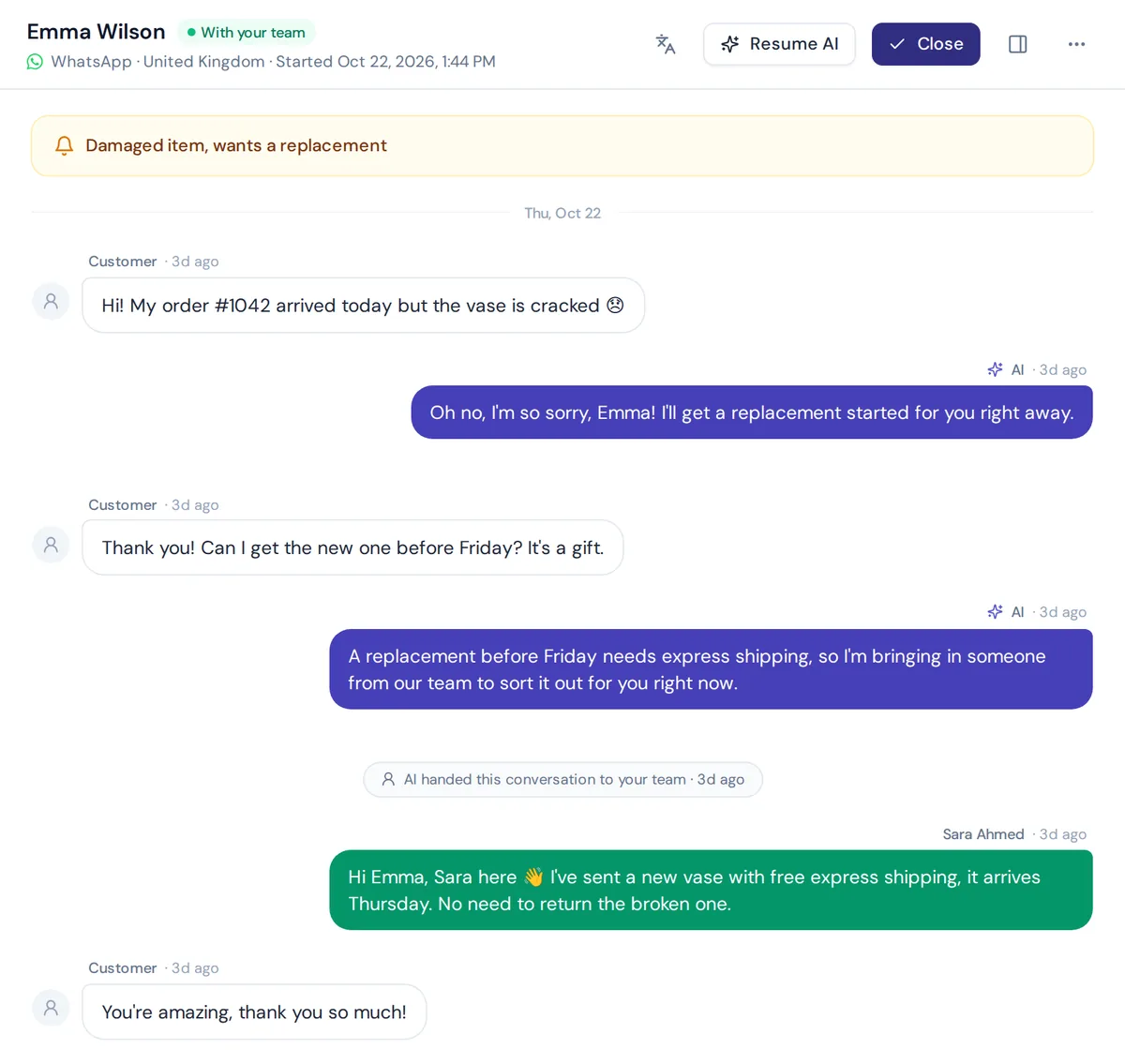
The "replace the whole support team" idea has mostly faded. The working model is hybrid: AI answers first, in real-time, and human agents take over when it matters. One agent can hold thousands of conversations simultaneously, but it still needs people behind it.
Good agents hand over when a customer asks for a person, gets upset, when the AI isn't confident, or when a rule matches (a refund above a set amount, say). The best ones pass a short summary so your team doesn't ask the customer to repeat everything. Can AI fully replace people? Not for complaints, exceptions and emotional moments.
7. E-commerce, ads and leads: the fastest-growing use case
More businesses run Click-to-WhatsApp ads, and the first reply to an ad click is now often handled by an AI agent that answers product questions, helps qualify leads and books a call while the buyer is still interested. In e-commerce, it shortens the customer journey from "is this in stock?" to checkout.
Outbound is changing too. Businesses send order updates, back-in-stock alerts and follow-ups to active contacts, with more care about opt-in, safe sending pace and easy STOP opt-outs. An agent that can answer replies to a broadcast turns a one-way message into real customer interactions at scale.
8. Guardrails, privacy and AI disclosure
As agents get more power, businesses care more about control. Common asks now include:
- Honesty: the agent should say "I don't know" rather than invent an answer.
- Disclosure: telling customers they're talking to AI. The EU AI Act includes transparency rules for this, so check what applies to you.
- Spam protection: junk chats shouldn't burn credits.
- Spending caps per agent, so a busy day doesn't create a surprise bill.
- Data use: clear terms on whether WhatsApp conversations are used to train AI models.
- Testing: checking answers after every change, before customers see a mistake.
How to add an AI agent to WhatsApp, step by step
You don't need to be a developer to get an agent ready to handle customer questions. Most platforms follow the same steps:
- Collect your knowledge. Website, help articles, policies, product list. If your return policy only lives in someone's head, write it down first.
- Pick a platform and train the agent on that content.
- Test before going live. Ask the questions customers really ask, including the odd ones.
- Link your number. Connect your WhatsApp Business account through the official API (API access through Meta), or use a quick QR code connect where the platform offers it. Use a dedicated WhatsApp number for the business rather than a personal WhatsApp account.
- Add actions. Connect your store, calendar or CRM so the agent can do more than talk.
- Set handoff rules and who on the team gets notified.
- Review weekly. Read unanswered questions and fill the gaps.
Connecting an agent to WhatsApp takes minutes. Good knowledge takes longer, and it's what decides quality.
Best WhatsApp AI agents for business: how to choose
There's no single best option. Use this checklist to compare WhatsApp AI agents for business:
- Official connection and a clear stance on the business-AI policy.
- Training sources you can add and correct yourself.
- Actions with your tools, with verification and limits.
- Handoff and inbox so your team can handle WhatsApp chats from any device, including WhatsApp Web style desktop access.
- Other channels if you also need website chat, Instagram or email.
- Languages your customers actually write in.
- Pricing clarity: the platform fee plus Meta message fees.
Options worth knowing
- AnytimeReply: an AI agent platform plus helpdesk for WhatsApp, website, Messenger, Instagram, Telegram and email in one inbox. Good fit for small and mid-size teams and multilingual customers. No phone or SMS channel.
- Meta's built-in agent: the simplest choice for basic needs inside WhatsApp.
- respond.io: known as an omnichannel messaging platform with AI agents, used by teams handling high volume.
- WATI and Interakt: WhatsApp-focused platforms popular with small businesses, known for broadcasts and team inbox.
- SleekFlow: an omnichannel tool that puts its AI agent front and center.
- Botpress: an AI agent builder for teams that want to design the agent themselves.
Features and prices change often, so check each vendor's pricing page before deciding.
How AnytimeReply fits as an AI agent platform
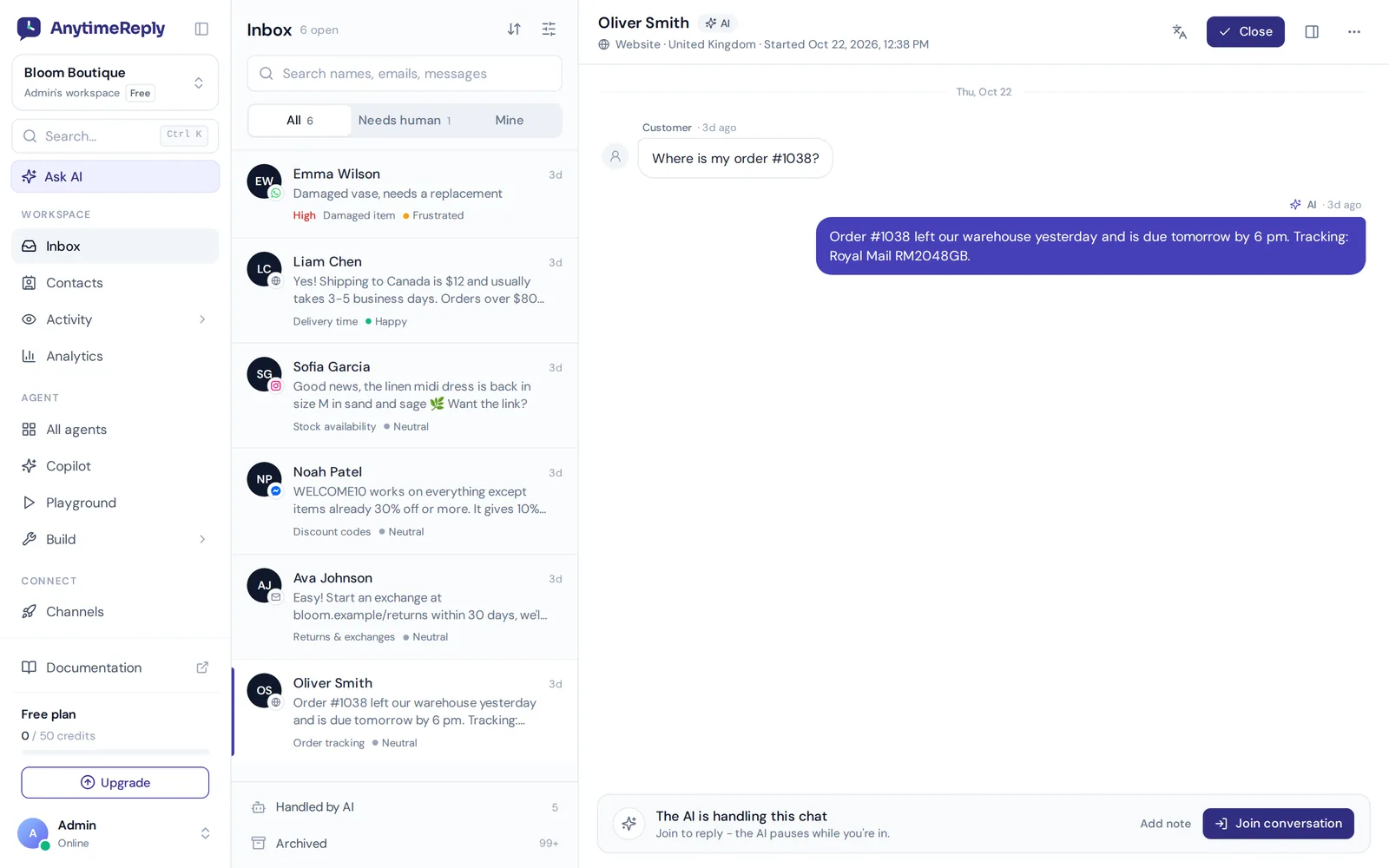
We built AnytimeReply around the hybrid model. You add your website, files, Notion pages or Shopify products, and the AI agent answers customers on WhatsApp in their own language. On our WhatsApp channel it understands voice notes and photos, and every answer has a confidence score, so it says when it doesn't know instead of guessing.
With actions, it can check orders, book meetings and manage subscriptions for verified customers, with confirmation, optional team approval and limits. When a person is needed, the chat lands in one shared inbox across WhatsApp, website, Messenger, Instagram, Telegram and email, so you can support WhatsApp alongside everything else. Guardrails pause spam before it uses credits, and we don't use customer data to train AI models.
Where we're not the right fit: if you need phone calls, voice agents or SMS, we don't offer those. WhatsApp starts on the Hobby plan; see pricing, and remember Meta message fees are separate.
Frequently asked questions (FAQ)
What are the current trends in AI agents for WhatsApp?
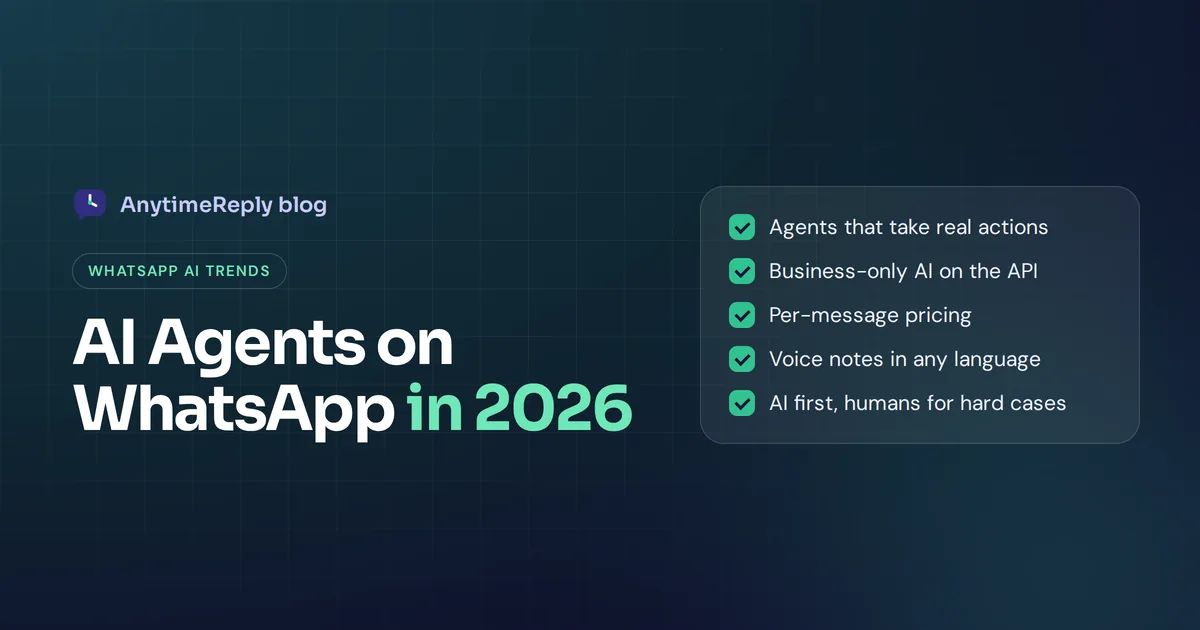
Agents that take actions, rules that only allow business-focused AI, per-message pricing that rewards fast answers, built-in options from Meta, voice note and image understanding, multilingual replies, and AI-first support with human handoff.
Can I still use AI on WhatsApp Business in 2026?
Yes, for business purposes like customer support, order tracking, bookings and sales. The updated terms block general-purpose AI assistants where the AI is the main product.
Can a WhatsApp AI agent handle complex questions?
It handles more than most people expect, as long as the answer is in its knowledge or connected systems. For sensitive or unusual cases, it should hand the chat to a person.
Do I need the WhatsApp Business API?
For most third-party agents, yes. AnytimeReply supports the official Business API and also a quick QR connect option.
Do I need coding skills?
No. Most platforms let you train the agent from your website and link your number without code. Custom actions may need someone comfortable with settings, not programming.
How much does a WhatsApp AI agent cost?
Expect two costs: the platform plan and Meta message fees, which depend on country and message type. Check both before you launch.
Final thoughts
The trend line is clear: WhatsApp agents are becoming focused, action-taking assistants that work alongside people. Build for your real customer questions, keep a human in the loop, and watch your message costs.
Want to try it on your own number? Start free with AnytimeReply, train the agent on your website and test its answers before you connect WhatsApp. No card needed.
Published 4 November 2026 by AnytimeReply team