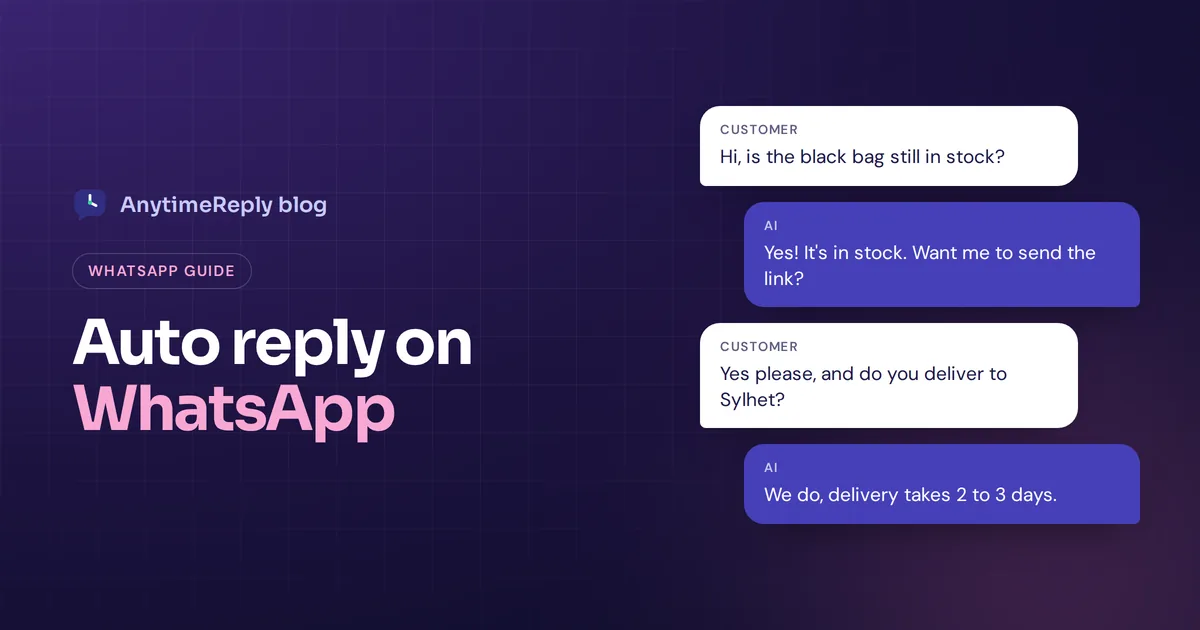
A customer messages your shop at 11 pm: "Is the black bag still in stock?" You're asleep. By morning they've bought it somewhere else. An auto reply on WhatsApp won't always save that sale, but a good one keeps the customer waiting instead of leaving.
The quick answer: you can send automatic replies using the free WhatsApp Business app (greeting messages, away messages and quick replies), or connect the WhatsApp Business API to a tool that answers questions for you, including with AI. The regular personal app has no built-in option.
Below: how to turn it on step by step, its limits, an AI option, and 12 ready-to-copy messages.
Does WhatsApp have auto replies?
Yes, but it depends on which version you use:
| Option | Automatic replies? | What it can do |
|---|---|---|
| Personal WhatsApp | No | Nothing built in. Third-party apps exist, but they're risky. |
| WhatsApp Business app | Yes, basic | One welcome text, one out-of-office reply, quick replies you send by hand |
| Business API + a platform | Yes, full | AI answers, conversation flows, routing to your team, a shared inbox |
Most small businesses start with the free app. That's a good first step. The limits show up once you get more than a handful of chats a day.
How to set auto reply in WhatsApp Business app
Using the WhatsApp Business app, you get two ways to send messages automatically. Menu names move a little between versions and between Android and iPhone, but on most phones you'll find them under Tools (or Settings > Business tools).
Out-of-office (away) message
- Open the Business app and go to Tools.
- Tap Away message and switch it on.
- Tap the text to edit your reply message, then save it.
- Pick a schedule: always send, a custom schedule, or outside of business hours.
- Pick recipients: everyone, everyone not in your address book, everyone except some contacts, or only selected contacts.
- Tap Save.
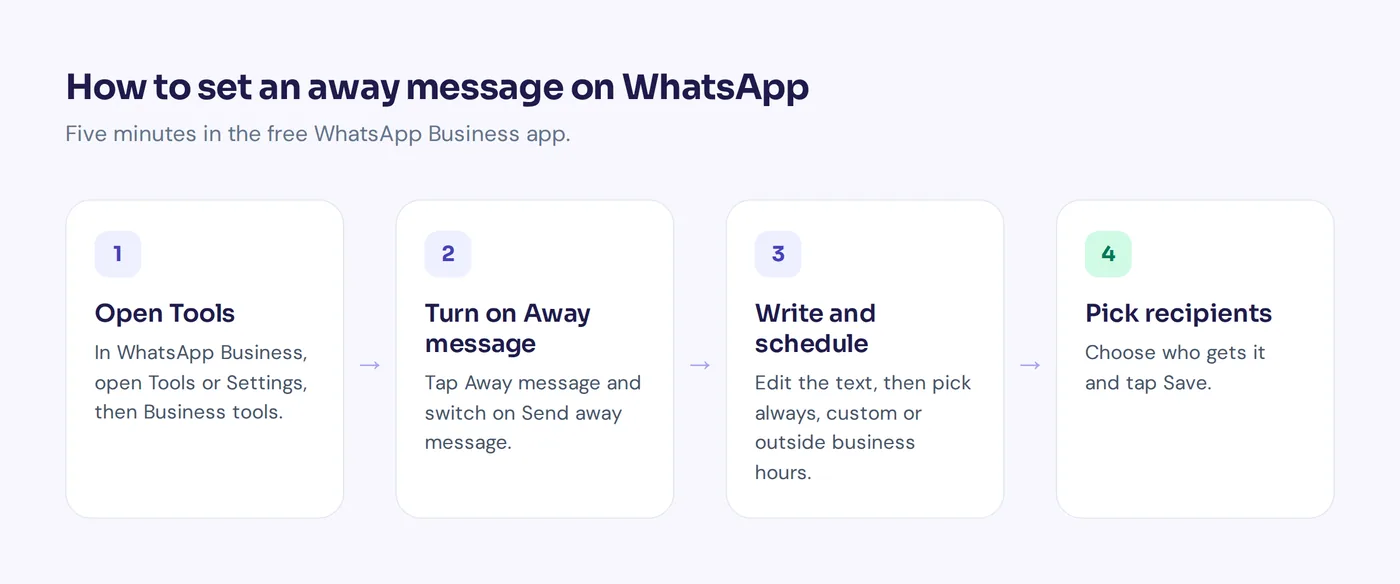
Tip: add your business hours to your business profile first. Then the "outside of business hours" schedule does the work, and you never forget to switch it on at night.
Greeting message
This one goes out when someone writes to you for the first time, or writes again after a long period of inactivity (WhatsApp says 14 days). Go to Tools > Greeting message, switch it on, edit the text, choose recipients and save. Use it to welcome new customers, inform customers when you usually answer and share your catalog link.
Quick reply shortcuts: faster manual responses
A quick reply isn't automatic, but these quick responses save a lot of typing. You write a pre-set answer once, give it a shortcut like "hours" or "delivery", and send it in any chat by typing "/" and picking it.
To create one, go to Tools > Quick replies, tap +, write the text, add the shortcut and save. Good for the questions you answer twenty times a day. The WhatsApp Help Center has more detail if your menus look different.
Can you set an automatic reply on personal WhatsApp?
No. The personal app has no auto-reply feature. You'll find apps on Google Play, such as Whatauto, that read your notifications and reply for you.
We'd be careful. Those apps need access to all your notifications, can break when WhatsApp updates, and unofficial automation can go against WhatsApp's terms. If you need replies for business, move your number to the Business app instead. You keep your chats.
Best auto reply messages for WhatsApp (12 templates)
Copy any WhatsApp auto reply message below, fill in the brackets and keep it short. A good one says hello, tells the customer what happens next and gives them something useful now.
Welcome messages
1. Hi! Thanks for messaging [Business Name]. Tell us what you're looking for and we'll get back to you soon. Browse our catalog here: [link]
2. Hello and welcome! Ask us anything about sizes, delivery or prices. We usually answer within [time].
3. Welcome back! Need help with an order? Send your order number and we'll check it.
After hours
4. Thanks for your message! We're closed right now. Our hours are [days, time]. We'll answer first thing when we're back.
5. Hi! Our team is offline for the night. Leave your question here and we'll answer by [time] tomorrow. Delivery info: [link]
Holidays and weekends
6. Eid Mubarak from [Business Name]! We're closed until [date]. Orders placed now ship on [date].
7. Hi! We're off for the weekend and back on Monday at [time]. Have a great weekend.
Busy hours
8. Thanks for writing! We're getting a lot of chats right now, so it may take a little longer. We haven't forgotten you.
Orders and bookings
9. To check your order, please send your order number and the phone number you used at checkout.
10. Want to order? Send the product name, size, quantity and address, and we'll confirm the total.
11. Thanks for contacting [Salon Name]! To book, send your preferred day, time and service.
Short and friendly
12. Hey! Got your message. Someone from our team will be with you shortly.
Small tips: give a specific time ("by 10 am" beats "soon"), ask for what you need (order number, address), and update holiday messages when the holiday ends.
Limitations of WhatsApp Business auto-reply features
- It can't answer your question. An away reply can't tell a customer the price, stock or delivery date. It only says "we'll get back to you".
- One greeting, one away reply. No replies based on what the customer actually asked, and no rules to create different answers for different questions.
- Hard to share. One number across a team gets messy fast, and there's no assignment, handoff, CRM link or shared dashboard.
- No analytics. You won't know which customer enquiries come up most or how your response time looks.
- No advanced features. No customizable conversation flows, no workflow logic and no chat bot that understands free text.
If you get a few messages a day, none of this matters much. If you get fifty, slow customer interactions start to hurt customer satisfaction and cost you sales.
WhatsApp automation with the API: AI that can answer your question
Looking to automate more than the basics? With the WhatsApp Business API, a platform can read customer messages and automatically reply with a real answer. A customer can send a WhatsApp message like "Do you deliver to Sylhet?" and get "Yes, delivery to Sylhet takes 2 to 3 days" right away, at 11 pm, in the language the customer wrote in.
That's what most people mean by an AI chatbot on WhatsApp. One rule to know: businesses can reply freely within 24 hours of the customer's last message. Messages you start outside that window need approved message templates. For replies to incoming questions, that's rarely a problem.
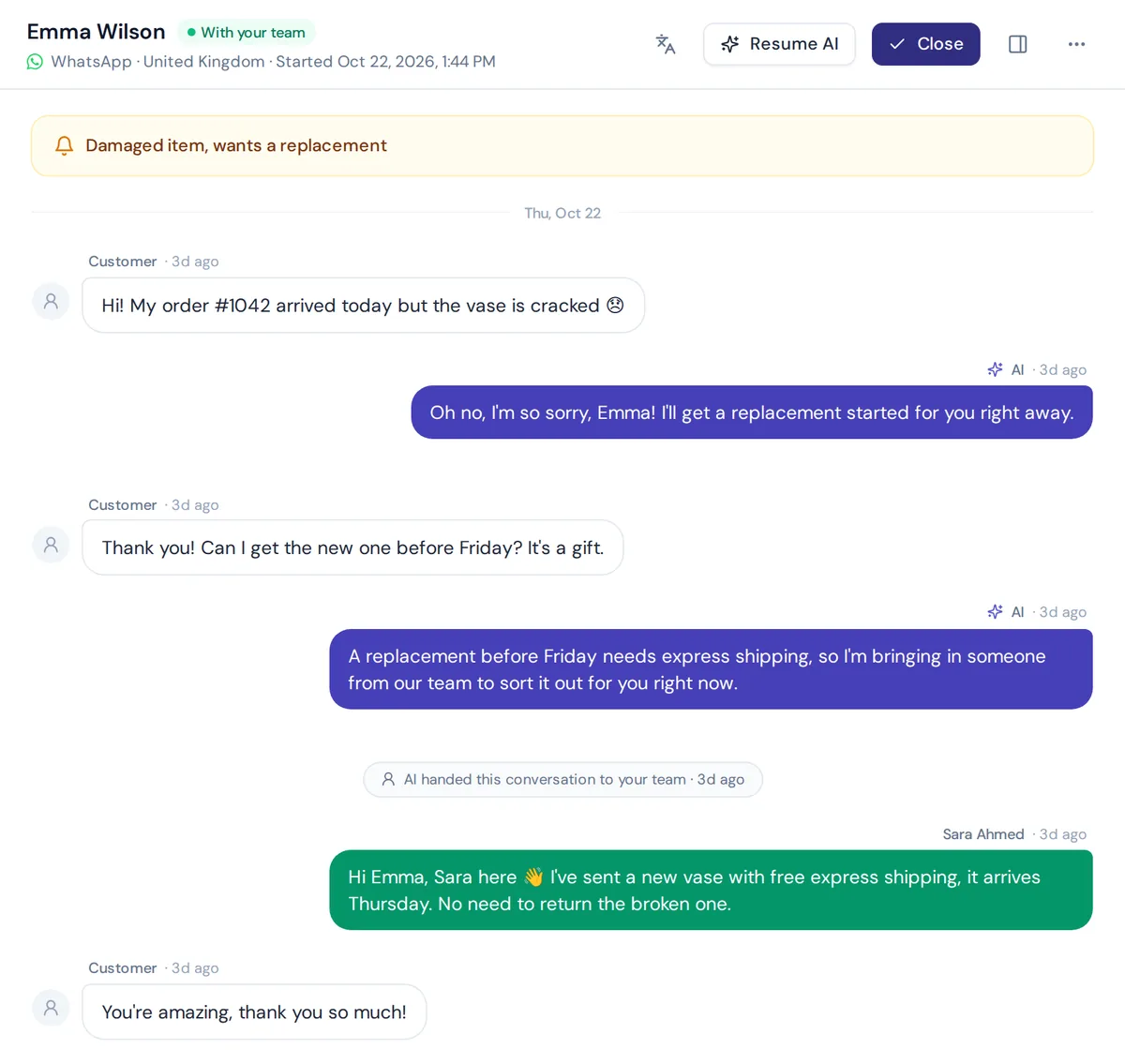
How AnytimeReply handles WhatsApp auto replies with AI
AnytimeReply connects to WhatsApp through the official Business API or a quick QR connect. You train the AI agent on your website, product pages, files and Q&A, and it answers customers day and night.
- Real answers to customer inquiries about prices, delivery, sizes, policies and order status (for verified customers, with Shopify or WooCommerce connected).
- The customer's language, including Bangla, Banglish, Hindi and Hinglish.
- Voice notes and photos are understood, not ignored.
- Actions and CRM: book meetings or save leads to HubSpot (paid plans).
- Human handoff to a shared inbox with a summary when a customer asks for a person, gets upset or the AI can't answer.
WhatsApp is available from the Hobby plan ($9 a month); check pricing as prices can change. And if you only get a few chats a week, the free Business app may honestly be all you need for now.
Frequently asked questions (FAQs)
How do I put an out of office message on WhatsApp?
In the Business app, go to Tools, tap Away message, switch it on, write your text, pick a schedule and recipients, and save.
Can I set up an automatic reply for my personal WhatsApp account?
Not with built-in features. Switch to the free Business app, or use a platform connected to the Business API.
Can I send different replies to specific customers?
Partly. The Business app lets you choose which contacts get your away reply, but the text is the same for every specific customer. Different answers per question need the API.
How do I add an AI auto reply in WhatsApp?
Connect your number to an AI platform through the Business API, train the AI on your website and FAQs, and turn on human handoff for tricky chats.
Is it safe to use automatic replies on WhatsApp?
The Business app tools and official API platforms are safe to use. Unofficial apps and bulk spam tools are what put numbers at risk.
Turn it on today
Start with the free tools: a clear welcome, an honest away reply and a few quick replies. That alone makes your business feel more responsive.
When "we'll get back to you" isn't enough and you want real answers at 11 pm, start free with AnytimeReply, no card needed, and connect WhatsApp when you're ready.
Published 4 November 2026 by AnytimeReply team