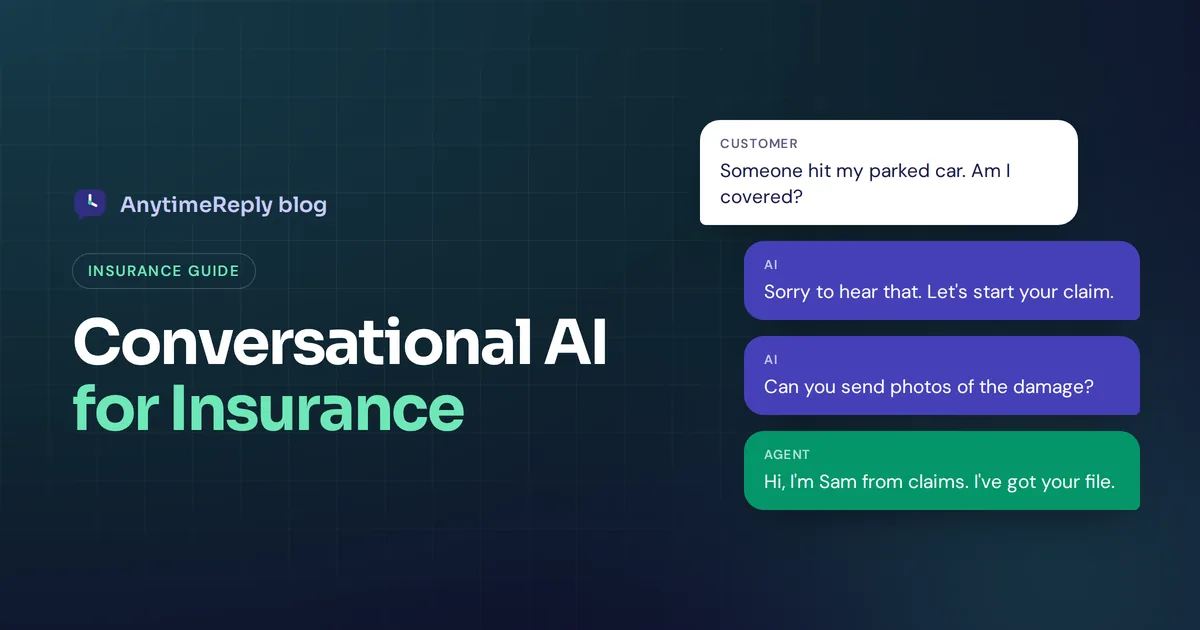
A customer gets a dent in their car on a Sunday evening. They want to know two things: is this covered, and what do I do now? Your office opens Monday at 9. By then they've searched online, felt confused and maybe asked another insurer for a quote.
That gap is where conversational AI for insurance helps. An insurance chatbot on your website or WhatsApp can answer policy questions, start a claim, collect photos and documents, and pass the tricky cases to a licensed person, at any hour. It doesn't replace your agents. It takes the repetitive questions off their desk so they can spend time where judgment matters.
This guide explains what insurance chatbots actually do, the use cases that work well today, the risks you need to plan for, and a simple way to start without betting the whole business on a bot.
What is conversational AI in insurance?
Conversational AI is software that understands what people type in plain language and replies the way a person would. It uses generative AI (large language models) and natural language processing, so a customer can write "my windscreen cracked, am I covered?" instead of clicking through a menu.
In the insurance industry, that usually means an AI assistant or chatbot that can:
- Answer questions about insurance products, coverage, deductibles and payments from your own documents.
- Guide a customer through the first steps of a claim and collect the customer information your claims team needs.
- Qualify new leads and pass them to an agent or broker.
- Send reminders about renewals and missing documents.
- Hand the conversation to human agents when the question needs a licensed person, a decision or empathy.
The big change from old-style bots is understanding. A scripted bot only follows the buttons someone built. Modern insurance chatbots handle the messy way real policyholders ask questions, in more than one language, and still stick to your approved information. Some newer tools go further with agentic AI, where the AI agent can also take actions like looking up a claim or updating a payment method.
Insurance chatbots vs AI agents vs human agents
People use these words loosely, so here's how they compare in insurance customer service:
| Rule-based chatbot | AI chatbot or AI agent | Human agent | |
|---|---|---|---|
| Understands free text | Barely, keywords and buttons | Yes, natural language | Yes |
| Available | 24/7 | 24/7 | Office hours |
| Policy questions | Only the ones it was built for | Most, from your documents | All, with context |
| Claim decisions | No | Should not decide alone | Yes |
| Upset customer after an accident | Poor | Okay for first contact, then hand over | Best |
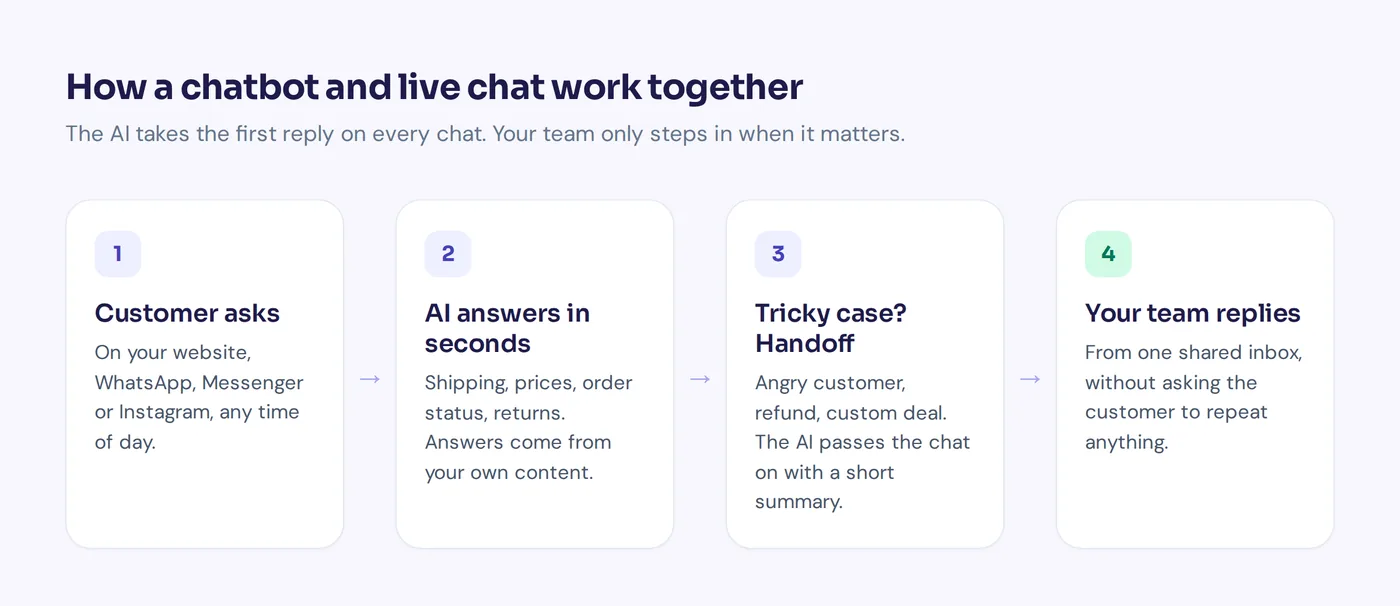
The sensible setup for most insurance companies, large insurance groups, agencies and brokers: the AI answers first, a customer service representative takes over anything sensitive.
Top insurance chatbot use cases
Not every use case is a good fit. These are the jobs where chatbots in insurance tend to work well, because the questions repeat and the answers live in documents you already have.
1. Policy service and coverage questions
"Does my home policy cover water damage from a burst pipe?" "What's my deductible?" "Can I add my son as a driver?" Policy service questions like these make up a big share of inbound messages. An AI trained on your policy wording, product pages and frequently asked questions can explain the general rules in plain words and point to the right document.
Important: the chatbot should explain what the policy says in general, not promise that a specific claim will be paid. That decision stays with your claims team.
2. Claims intake and first notice of loss
First notice of loss (FNOL) is the first report a policyholder makes after something goes wrong. It's often messy: the customer is stressed, details are missing, photos come later. Insurance chatbots handle this well by walking them through it step by step:
Customer: Someone hit my car in a parking lot.
AI: I'm sorry to hear that. Is everyone okay? Once you're safe, I can start your claim. What's your policy number, and when and where did it happen?
Customer: Today around 3 pm, outside the supermarket on King Street.
AI: Thanks. Could you send a few photos of the damage and, if you have it, the other driver's details? I'll pass everything to our claims team, who will contact you within one working day.
Claim processing still belongs to people. But the adjuster starts with a complete file instead of chasing the basics by phone.
3. Claim status updates
"Where is my claim?" is the insurance version of "Where is my order?" If your claims software has an API, an AI agent can look up the status for a verified customer and reply instantly. If not, it can collect the claim number and route the question to the right team.
4. Quotes and lead qualification
For insurance agencies and brokers, many website visitors want a rough idea of price before they talk to anyone. The chatbot can ask the qualifying questions (type of cover, number of drivers, property type, renewal date), capture contact details and book a call. Your team gets warm leads with the basics filled in, and customers get a quicker path to the appropriate insurance.
5. Renewals, payments and document reminders
Renewals, failed payments and missing documents are routine service tasks that eat time. A chatbot can answer "how do I update my card?", explain what's needed for renewal and send one polite follow-up when a customer goes quiet, which keeps customer engagement up between renewals.
6. Support for agents and internal teams
Internally, AI can answer staff questions about underwriting guidelines, product rules or HR policies, so new agents don't interrupt a senior colleague for every question.
7. Customers who write in other languages
Many insurance providers serve customers who are more comfortable in another language. A good AI replies in the customer's language, which helps enhance customer experience and cuts down on misunderstandings about coverage.
Benefits of conversational AI for insurance companies
- Answers at any hour. Accidents and burst pipes don't wait for office hours. Customers get a reply on a Sunday night, which helps customer satisfaction.
- Shorter queues. When the AI handles routine questions, your team can focus on complex insurance claims and sales conversations.
- Better claim files. Structured intake means fewer back-and-forth calls and smoother insurance workflows.
- More consistent answers. The chatbot answers from the same approved documents every time, instead of each agent remembering the rules a bit differently.
- Insight into customer needs. Conversation analytics help you analyze customer questions, see which topics come up most and where your documents are unclear.
We're not putting a percentage on any of this. Results depend on how good your documents are and how well you set up the handoff. Be careful of vendors who promise a fixed saving before they've seen your data.
Risks and limits you should plan for
Insurance is regulated and personal. A wrong answer can cost insurance customers money, trust or worse. Here's what to think about before you go live.
Accuracy and made-up answers
AI systems can sound confident when they're wrong. Limit the chatbot to your own approved content, use verified answers for sensitive topics and choose a tool that says "I don't know" instead of guessing.
Advice vs information
In many markets, recommending a specific policy counts as regulated advice. Set clear rules: the AI explains insurance products and policy terms, a licensed person gives advice. Check the insurance regulations where you operate with your compliance team.
Customer data, privacy and security
Insurance conversations include personal and sometimes health or financial data. Ask any vendor how customer data is stored, who can see it, whether it's used to train AI models and whether they sign a data processing agreement. Only you and your legal team can decide if a tool meets your obligations.
Claim decisions and fairness
Don't let a chatbot approve or deny claims on its own. Use AI to collect and organize information, and keep the decision with a trained adjuster.
Knowing when to hand over
Someone who just lost their home in a fire needs a person, not a bot. Set rules so the AI hands over when a customer is upset, asks for a person or raises something sensitive.
How to implement AI in insurance customer service, step by step
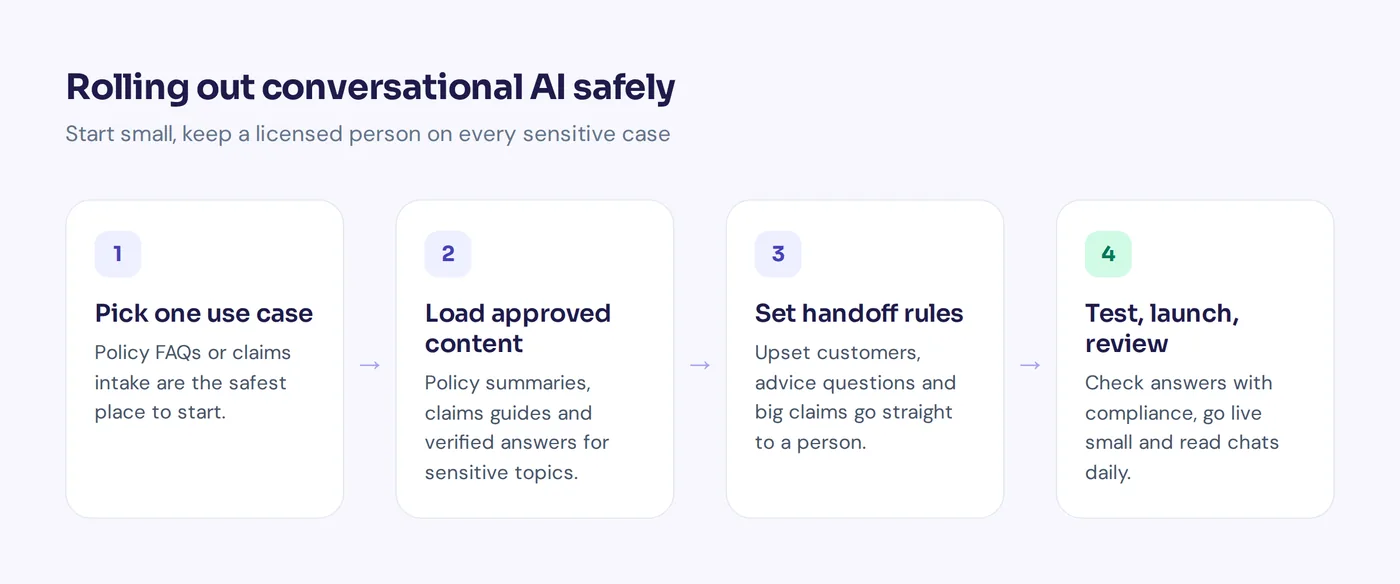
- Pick one or two use cases. Policy questions and claims intake are usually the safest start. Leave quotes and complex insurance servicing for later.
- Gather your best content. Policy summaries, product pages, claims guides, FAQs. If your team struggles to find an answer, the AI will too. Fix gaps first.
- Write verified answers for sensitive topics. Deductibles, cancellation rules, claims deadlines. These should come from approved wording.
- Set handoff rules. Decide exactly when a person takes over: claims above a certain value, complaints, upset customers, advice questions, anything the AI isn't sure about.
- Choose your channels. Start where customers already write to you: your website, WhatsApp or email. Voice AI for phone lines is a separate project with its own tools.
- Connect existing insurance systems if needed. Claim lookups and policy changes need an API to your core insurance systems or CRM. Many teams launch without this and add it later.
- Test with real questions. Use messages from the last few months. Include awkward ones. Have a compliance or claims person review the answers.
- Launch small and measure. Read conversations daily at first. Track resolution without handoff, customer ratings, response time and the quality of claim files reaching your team.
What to look for in AI insurance chatbots
- Answers only from your content, with a way to see where each answer came from.
- Clear "I don't know" behavior instead of guesses.
- Human handoff with context, so customers never repeat themselves.
- The channels your customers use: website chat, WhatsApp, email and social messaging. If you need voice AI for phone calls, check that specifically, as many AI platforms are chat only and others are voice only.
- Integrations with your CRM, policy admin or claims software, or an API to connect them.
- Security and data handling that your compliance team can review, including a DPA and a clear statement on AI training.
- Analytics that show unanswered questions and customer sentiment, so you can improve customer answers and every customer interaction over time.
How AnytimeReply fits insurance agencies (and where it doesn't)
AnytimeReply is a general AI platform for customer support, not insurance software. It works well for insurance agencies, brokers and smaller insurers who want an AI agent on their website and messaging channels with a proper team inbox behind it.
- An AI agent trained on your documents. Upload policy summaries, claims guides and FAQs, or connect your website and Notion. The AI agent answers in the customer's language and shows a confidence score. When it doesn't know, it says so.
- Verified Q&A. Write approved answers for deductibles, cancellations or claim deadlines. These always win over other sources.
- Handoff to your team. Conversations move to a shared inbox with a summary when a customer asks for a person, gets upset, the AI can't answer or a rule matches.
- Procedures with approvals. Write how your team handles requests as plain steps, with required steps and approvals enforced.
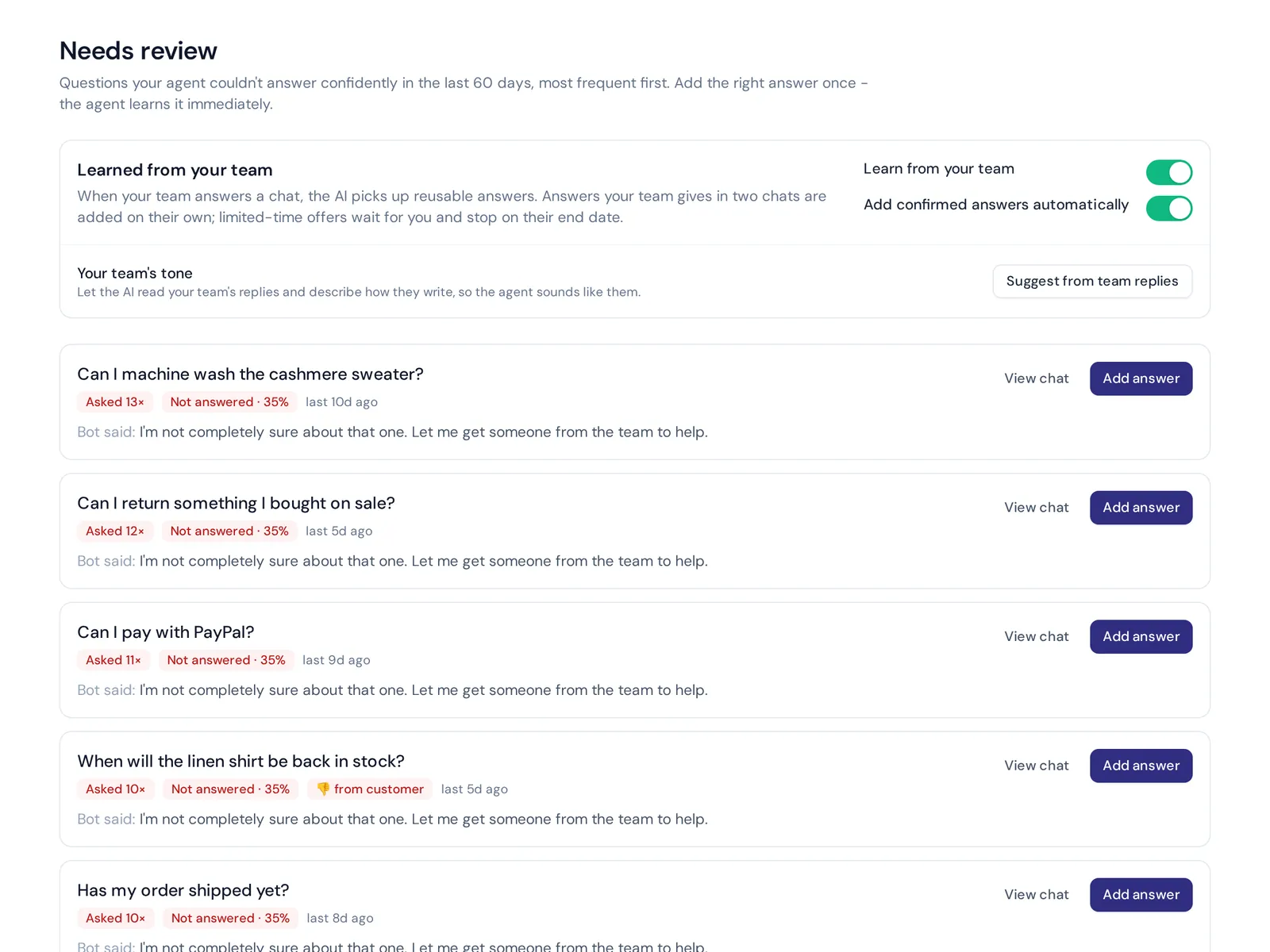
- Knowledge gaps. See the questions it couldn't answer and add the answer in one click.
Now the honest part. AnytimeReply works over website chat, WhatsApp, Messenger, Instagram, Telegram, email and Slack. It does not answer phone calls or SMS, so if your customers mostly call, you'll need a voice tool for that. We also don't claim insurance-specific certifications, so have your compliance team review our security page and DPA before you put policyholder data in. Website chat is on the free plan; messaging channels, actions and procedures start on paid plans (see pricing).
Frequently asked questions
How is conversational AI used in insurance?
Mainly for customer service: answering policy and coverage questions, taking first notice of loss, giving claim status updates, qualifying leads and sending renewal reminders. It's also used internally to help agents find product and underwriting information.
Can AI chatbots handle claims?
They can collect claim details, photos and documents and route them to the right team. The decision to approve or deny a claim should stay with a trained adjuster.
Are insurance chatbots available 24/7?
Yes. That's one of the main reasons to use them. The AI answers at any hour and leaves anything it can't handle for your team the next working day.
Is a chatbot for insurance safe for policyholder data?
It depends on the vendor and your setup. Check how data is stored and encrypted, who can access it, whether it trains AI models and whether the vendor signs a DPA. Your compliance team should review this before launch.
Will AI replace insurance agents?
No. It handles repetitive questions and intake so agents can spend more time on advice, complex claims and relationships.
The future of chatbots in insurance: start small
AI technologies will keep getting better, but the winners across insurance will be the teams that use them carefully. AI works best when it does the boring parts well and knows when to step aside. Start with policy questions and claims intake, keep a human on every sensitive case, and grow from there.
Want to see how it would answer your customers? Start free with AnytimeReply, no card needed, train it on your policy documents and test it before anyone else sees it.
Published 2 November 2026 by AnytimeReply team